VGC
TM
SEQUENTIAL VALVE GATE CONTROL
INSTRUCTION MANUAL
©INCOE® CORPORATION 2/2009
Pg.
www.incoe.com
OPERATION
2
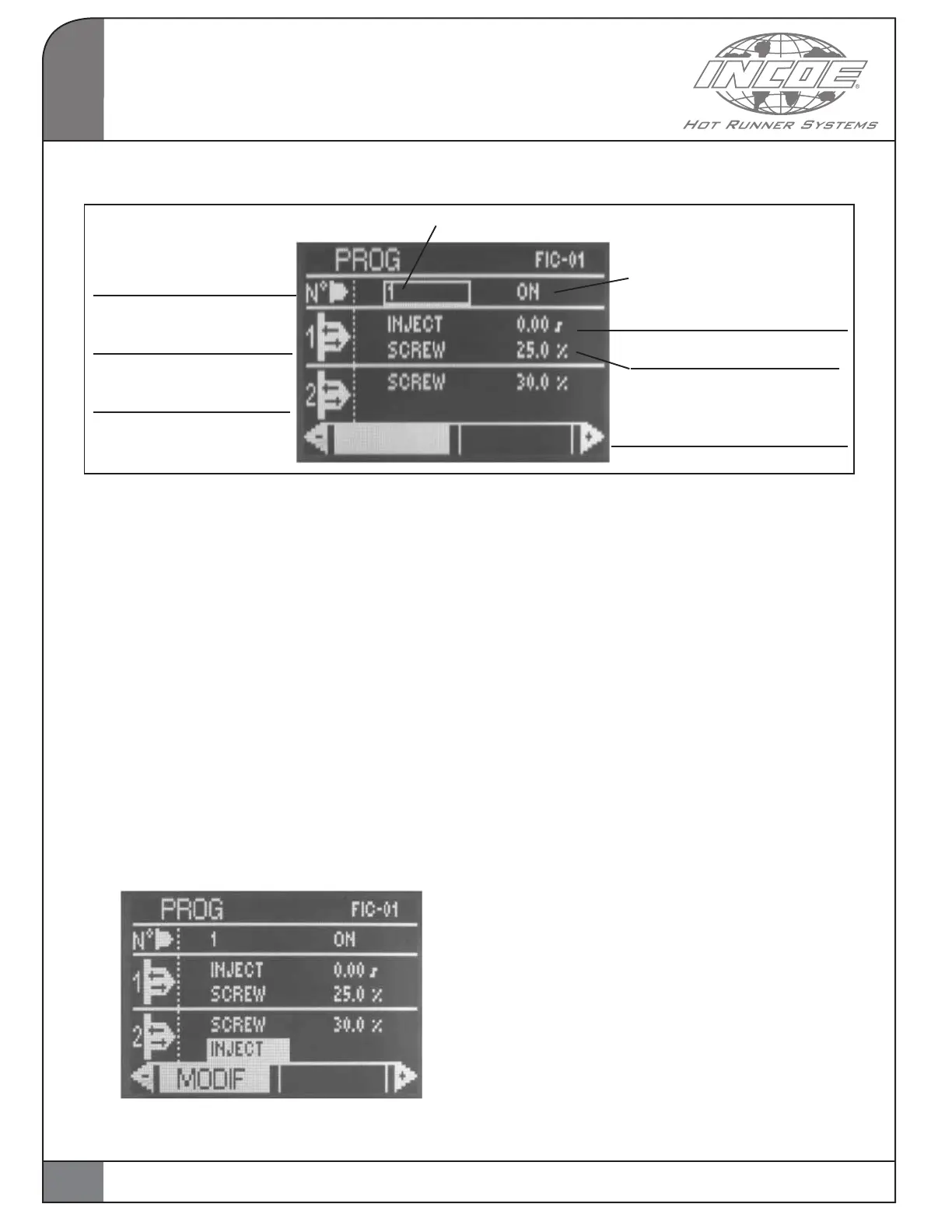
Valve gate number to be
programmed
Opening and closing No1
for selected valve gate
Opening and closing No2
for selected valve gate
Switch on/off valve gate
Triggering signal for opening
Triggering signal for closing
Value for valve gate actuation
(in the unit corresponding to
the selected command mode)
Cursor
12
2.4.1 MODIFY A PROGRAM
This mode is to program the movements required
for each valve gate during the injection cycle
(injection signal, screw position, etc.)
Select and validate PROG for accessing the page
for programming from the main menu :
The page below is displayed:
To program another valve gate, enter the required
valve gate number on the alpha-numerical keyboard
and validate.
To switch a valve gate on or off, move the cursor
accordingly to ON or OFF.
Then validate the function MODIF to select from
ON or OFF with the arrows.
Then validate again to move to the next field.
Example of a program:
Validate MODIF when it appears to select another
signal. Then select the required signal with the
arrows by moving left or right.
Move the cursor on the field to modify values for
triggering moments and enter the required value
on the alpha-numerical keyboard and validate.
One can select among 3 triggering signals for
programming.
The values for programming are:
1) Injection start: the value to enter is the delay
between the injection start signal and the required
triggering moment.
2) Hold start: the value to enter is the delay between
the hold start signal and the required triggering
moment.
3) Screw position: The value to enter depends on
the selected unit:


 To Next Page