VGC
TM
SEQUENTIAL VALVE GATE CONTROL
INSTRUCTION MANUAL
©INCOE® CORPORATION 2/2009
Pg.
www.incoe.com
2.5 FILE MANAGEMENT
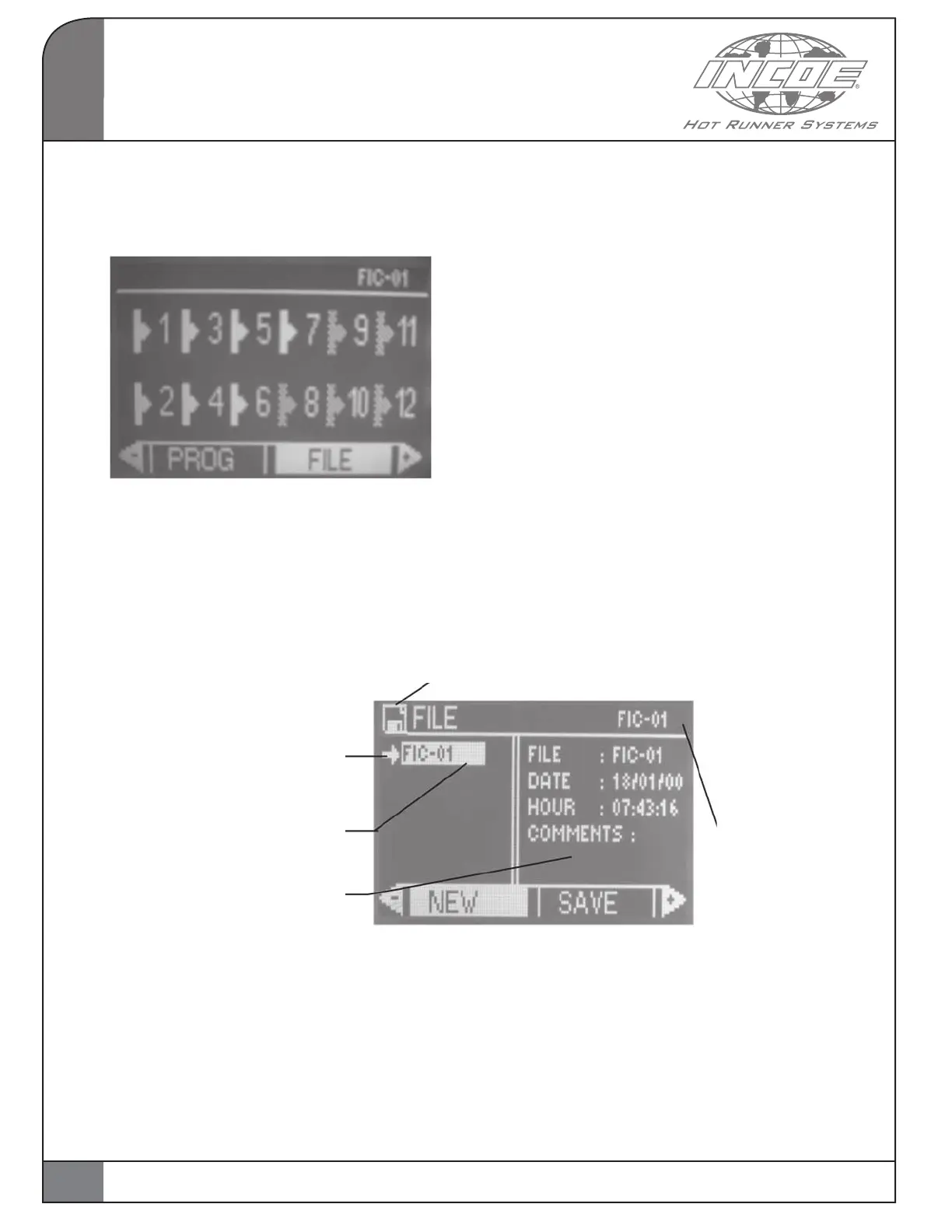
Select and validate the FILE function from
the main page.
The page below is displayed :
OPERATION
2
The arrow shows the file selected in
the list
File on a white background: the
current sequence originates
from this file
Various info about the selected file
This page is for the management of sequence files.
Some information like date and time of creation
and comments can be saved as well.
The name of the
current file is
displayed in all
pages
This floppy icon is shown when the current sequence
has been modified but has not been saved as a file.
NEW: to create a new sequence file.
SAVE: to save or modify the selected file.
The current program is saved as the selected file.
LOAD: to load the sequence saved in the
selected file.
DELETE: to cancel the selected file.
Important Notice:
• The le name on a white background is the
current sequence file and is always displayed
in the top right section of all pages in the
program.
• Maximum 8 les can be saved in this menu
FILE. You must delete unused files for saving
a new file.
14


 To Next Page