VGC
TM
SEQUENTIAL VALVE GATE CONTROL
INSTRUCTION MANUAL
©INCOE® CORPORATION 2/2009
Pg.
www.incoe.com
INTRODUCTION
2
2
1
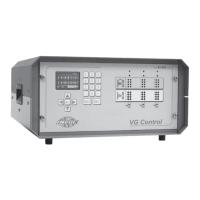
1.0 DESCRIPTION OF THE CABINET
These cabinets are designed for the controlling of
4-8- or 12 valve gates.
1.1 PROGRAMMING
Programming a sequence is accomplished with
the integrated multi-lingual user interface. This
applies to both types of VGC cabinets (keyboard
an blue backlit LCD display), offering the following
features:
• Programming the actuation of the valve gates.
• Loading / Saving 8 sequence les.
• Manual actuation of the valve gates.
• Display cycle time.
• Display value of screw position.
Optional Limit Switches: It is possible to use
position sensors and display the valve gate pin
positions.
1.2 CONTROL
Actuation of 1 or 2 valve gates opening and closing
per cycle:
Each movement can be triggered using one of the
following signals :
• Timer function from injection start or hold start.
• Screw position in %, cm
3
or in mm.
1.3 SIGNALS COMING FROM THE
INJECTION MOLDING MACHINE
Injection Start Signal is required.
The others signals recomended listed below are
optional
• Injection Hold signal.
• Screw position signal.
Important Notice : It is required to connect at least
the injection start signal to program a sequence
based on time.
For connecting these signals, please refer to the
wiring diagram on Page 3.


 To Next Page