VGC
TM
SEQUENTIAL VALVE GATE CONTROL
INSTRUCTION MANUAL
©INCOE® CORPORATION 2/2009
Pg.
www.incoe.com
2.7 MAIN SYSTEM PARAMETERS VALUES
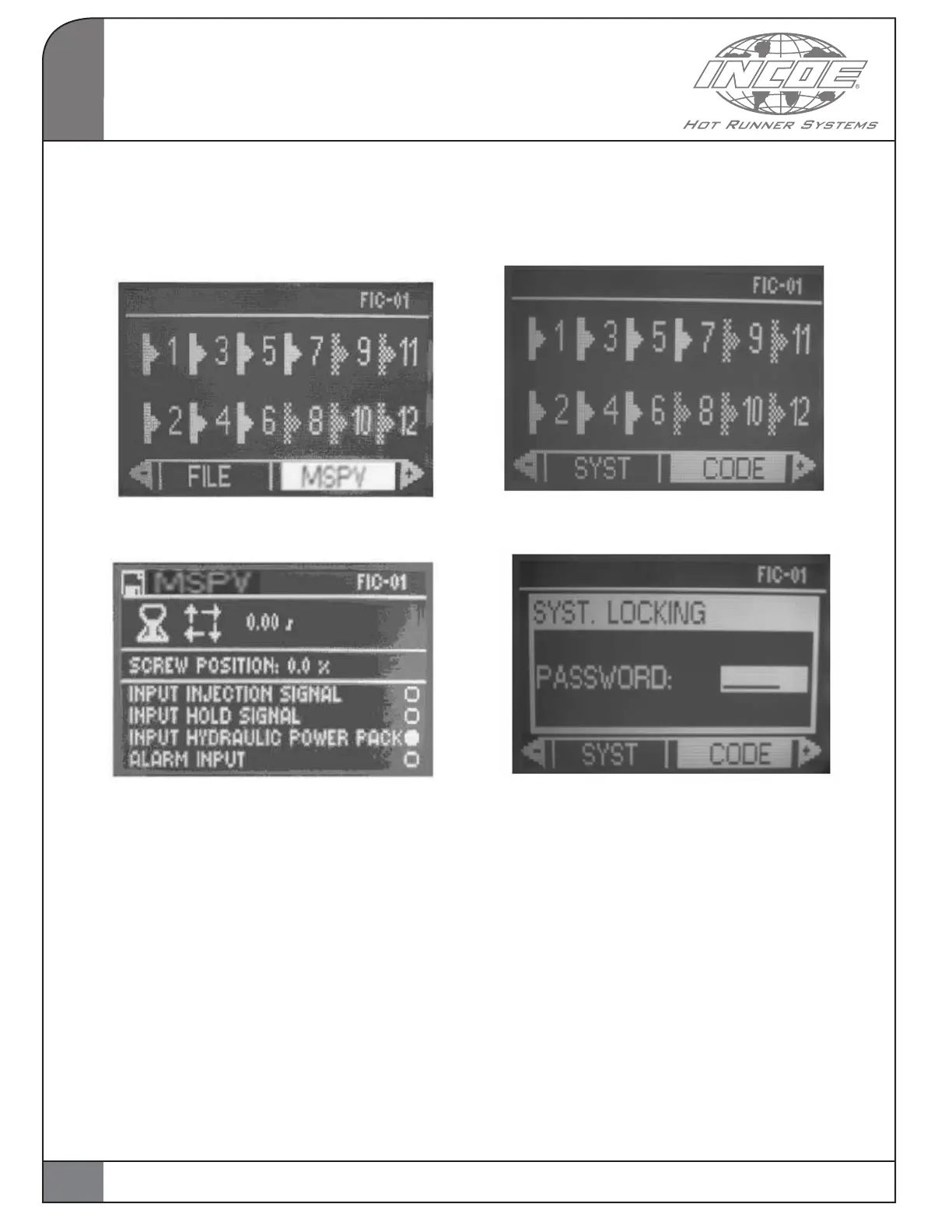
Select and validate the function MSPV from the
main page
The page below is displayed :
The cycle time and the actual screw position in the
selected unit are displayed on this page.
Notice : the percentage shown on this page is
expressed for the total screw stroke and 0% means
an empty screw.
The status of input signals (injection start, hold
start, hydraulic power pack and alarm input) a are
displayed above.
Press ESC to go back to main page.
2.8 SYSTEM LOCKING
Select and validate the function CODE from the
main page.
The page below is displayed :
It is possible to lock or unlock the system from
this page by entering a password with the alpha-
numerical keyboard.
A message confirming the current status is
displayed in the top left section of the page once
the password has been entered.
The default password factory set is 123456.
Use the function SYST and validate with NEXT
to modify the password in page 2 of system
parameters.
Then select the line “MODIF PASSWORD” and
validate when MODIF is on a white background.
The page below is displayed.
2
OPERATION
16


 To Next Page