InfiNet Wireless R5000 Technical User Manual
Copyright © 2004-2006 by InfiNet Wireless Limited.
12
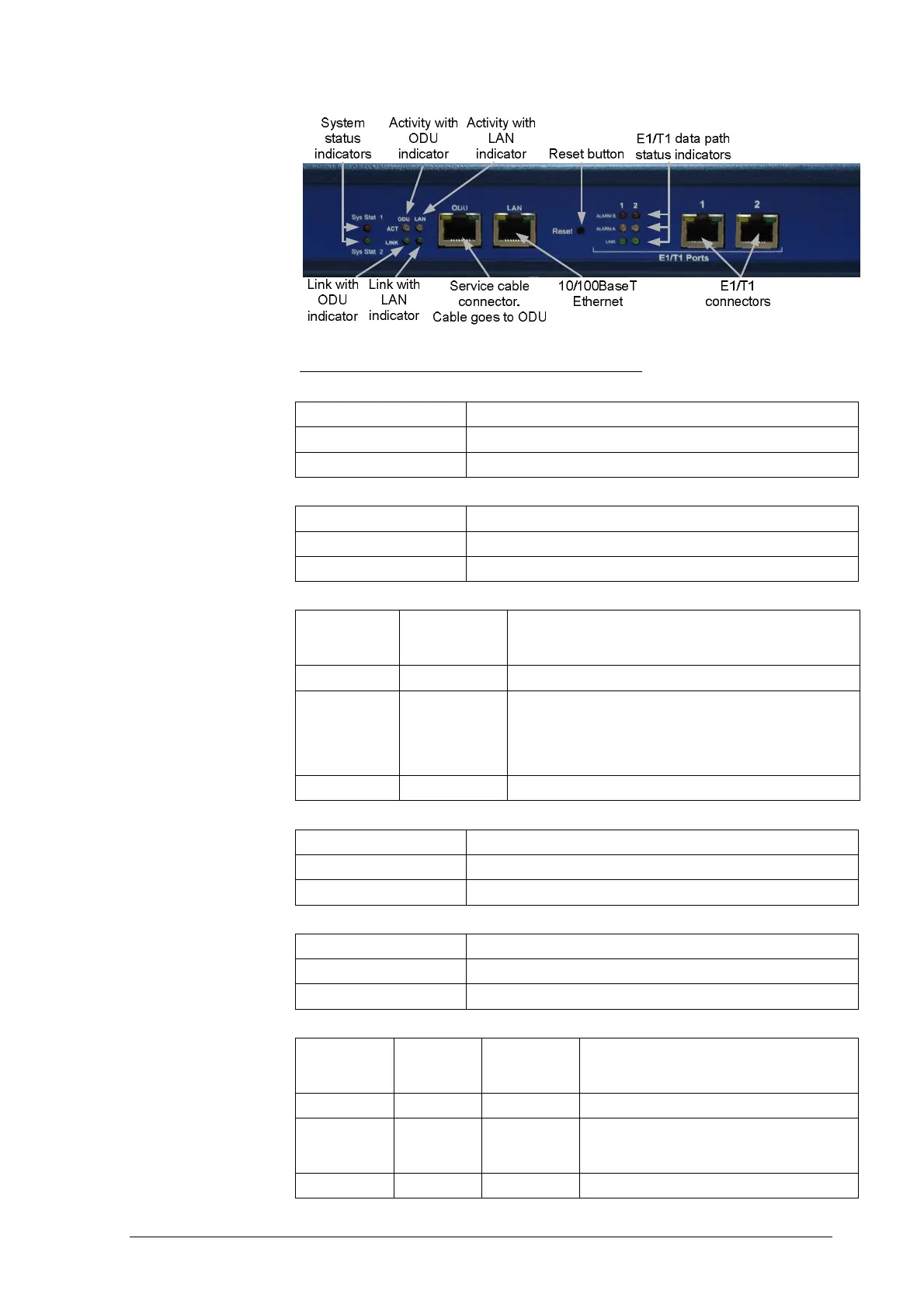
Indicators modes tables for IDU with E1/T1 ports.
Fuse failure indicator (Check Fuse)
Indicator (red) Status
Off Fuse is okay
On Fuse failure
Power indicator (Power On)
Indicator (green) Status
Off No power
On Power is okay
System status indicators (Sys Stat1 и Sys Stat 2)
Sys Stat 1
Indicator
(red)
Sys Stat 2
Indicator
(green)
Status
On Off Failure during power-on self-test
Off On
System is operating correctly: no failures during tests found,
E1/T1 data are transferred without failures between external
E1/T1 source and IDU device and then transmitted and
received correctly through IDU and ODU to the other side of
a radio link
Alternating On One of the data paths is not operating correctly
Link with ODU/LAN indicator (LINK)
Indicator (green) Status
Off No connection between IDU and ODU/LAN
On Connection between IDU and ODU/LAN is okay
Activity with ODU/LAN indicator (ACT)
Indicator (yellow) Status
Off Data is not transferred between IDU and ODU/LAN
On Data is transferred between IDU and ODU/LAN
E1/T1 data path status indicators (ALARM B, ALARM A, LINK)
LINK
Indicator
(green)
ALARM A
Indicator
(yellow)
ALARM B
Indicator
(red)
Status
Off Off Off E1/T1 port not configured
On Off Off
Normal mode: E1/T1 data are transferred
without failures between external E1/T1 source
and corresponding E1/T1 port of the IDU
On Off On Framing error



 To Next Page