InfiNet Wireless R5000 Technical User Manual
Copyright © 2004-2006 by InfiNet Wireless Limited.
57
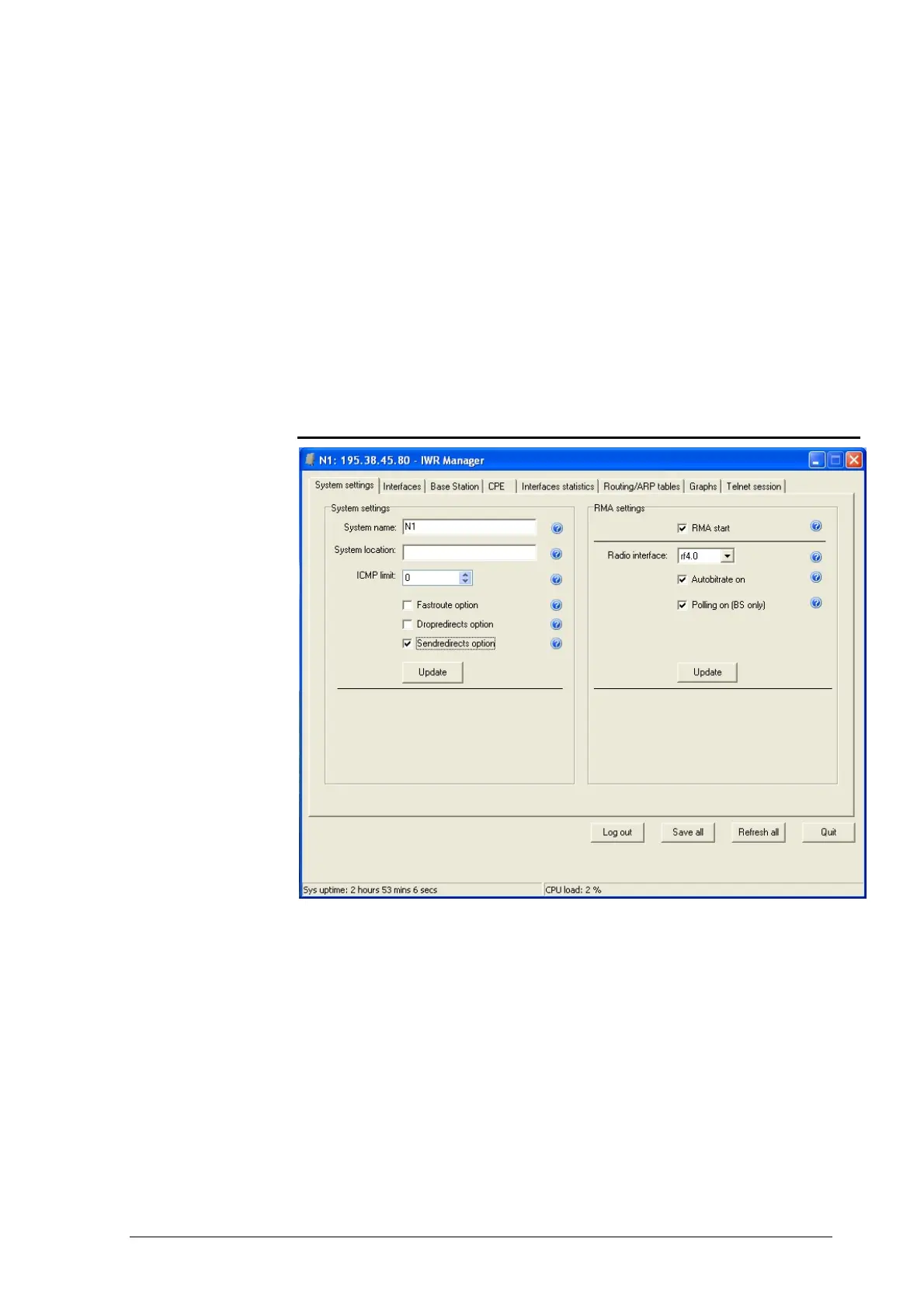
If authorization went well, the user will be able to see “IWR Manager” window
after all parameters had been downloaded from the router.
In system panel at the bottom of the window the following parameters are
permanently updated:
• Sys uptime. A time since last device’s reboot.
• CPU load. Current CPU load.
Also, a set of buttons is also available at the bottom of the window:
• Save all. Saves all changes. Equivalent to “config save” command.
• Refresh all. Updates all information is all tabsheets.
• Quit. Closes the application.
System settings
The following system parameters can be changed/viewed in this sheet:
• System name
• Optional parameter setting a geographical location of the router
• ICMP limit sets the maximum number of outgoing ICMP packets per
second. Avoid overloading the device when running scanning network.
When set to 0 (zero) all restrictions removed
• Enable/disable the fast track route. In this mode, the device is invisible
to the trace route services, but it performs all router functions
• Enables/disables the ability of the system to deal with icmp redirect
messages to adjust route tables in the wrong routing
• Enables/disables the ability of the system to send icmp redirect
messages to suppress source of the packages when routing is configured
incorrectly.



 To Next Page