18
EZ Mobile allows you to use the media les on your portable device via the DLNA (Digital Living Network Alliance) server
To access the media les stored on your portable device, do the following:
1. In your portable device, download a DLNA compatible Digital Media Server from the App Store (iOS) or Play Store (Android) and open the application.
(For example, "Pixel Media Server - DMS" > tap .)
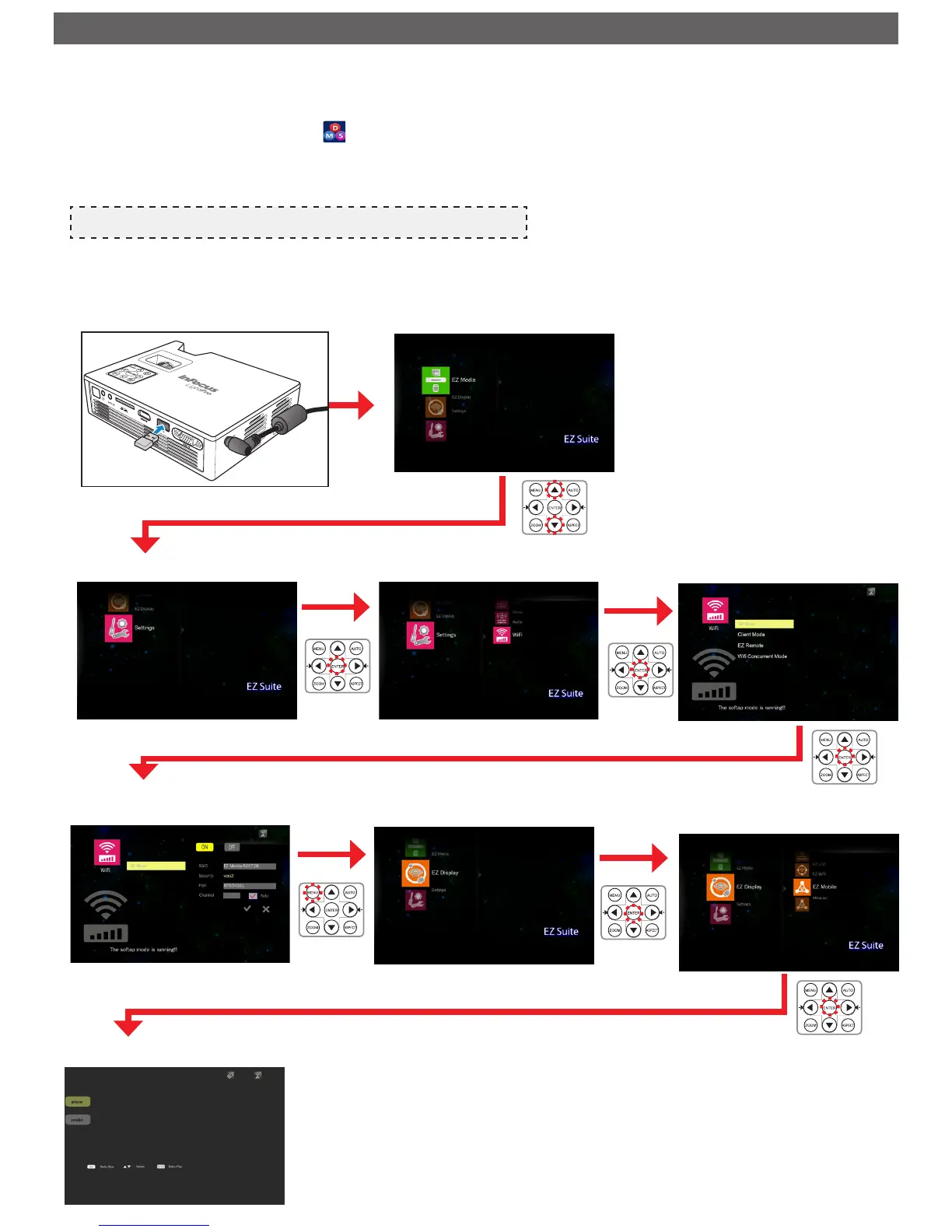
2. Plug the optional Wi-Fi dongle (SP-WIFIUSB-2) into the projector.
3. Enter the Access Point (AP) Mode in projector's menu and set the mode ON (Home Menu > [Settings] > [WiFi] > [AP Mode]).
4. Connect your portable device to the projector's wireless network.
Note
The default access password is 87654321. The password can be changed on projector's AP Mode menu.
5. Go to projector's Home Menu > [EZ Display] > [EZ Mobile] and wait until the connection is established.
The media les on your portable device can be accessed using the projector.



 To Next Page