5
Connector panel
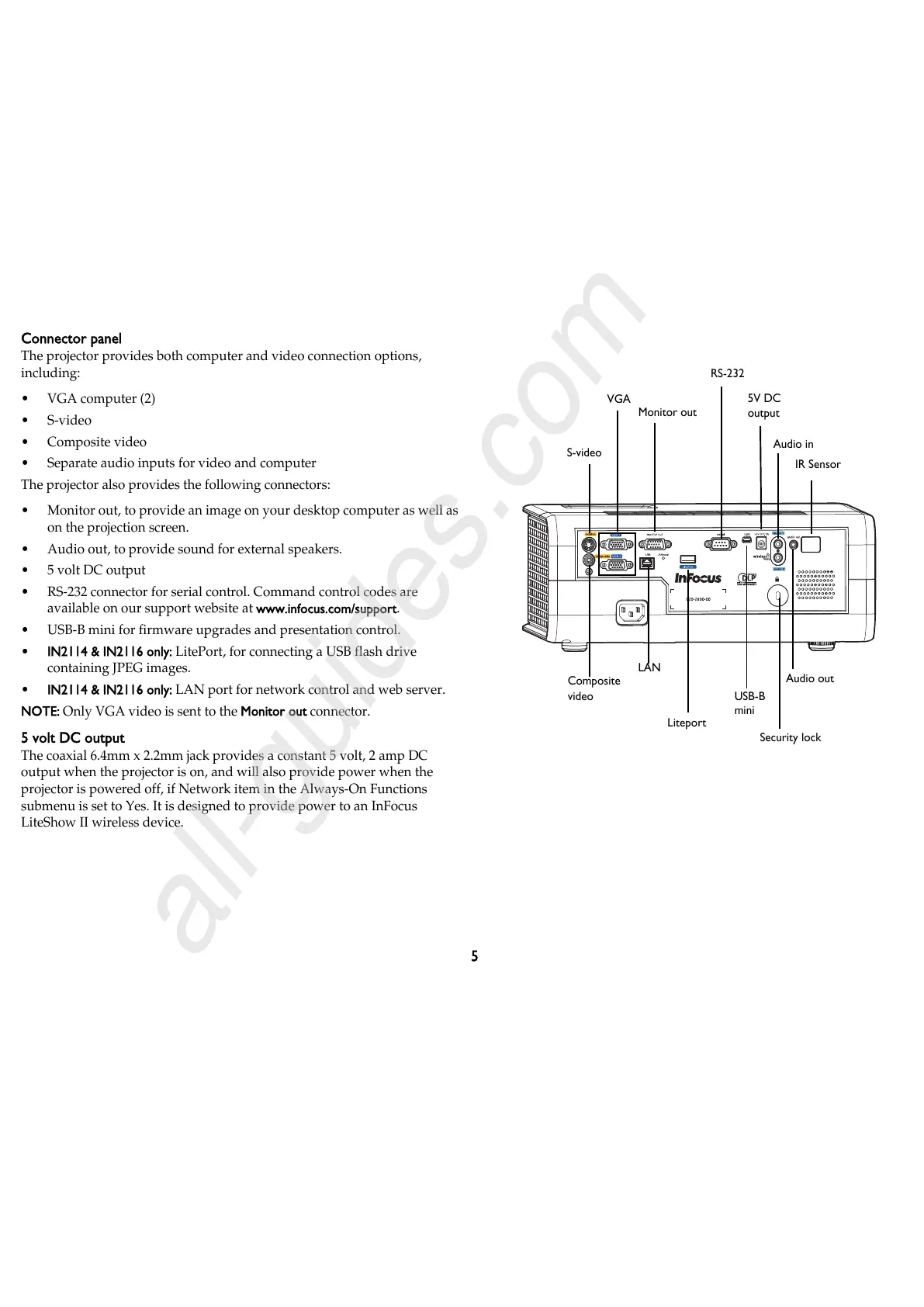
The projector provides both computer and video connection options,
including:
•VGA computer (2)
•S-video
•Composite video
• Separate audio inputs for video and computer
The projector also provides the following connectors:
• Monitor out, to provide an image on your desktop computer as well as
on the projection screen.
• Audio out, to provide sound for external speakers.
• 5 volt DC output
• RS-232 connector for serial control. Command control codes are
available on our support website at www.infocus.com/support.
• USB-B mini for firmware upgrades and presentation control.
• IN2114 & IN2116 only: LitePort, for connecting a USB flash drive
containing JPEG images.
• IN2114 & IN2116 only: LAN port for network control and web server.
NOTE: Only VGA video is sent to the Monitor out connector.
5 volt DC output
The coaxial 6.4mm x 2.2mm jack provides a constant 5 volt, 2 amp DC
output when the projector is on, and will also provide power when the
projector is powered off, if Network item in the Always-On Functions
submenu is set to Yes. It is designed to provide power to an InFocus
LiteShow II wireless device.



 To Next Page