English
18
SETUP AND INSTALLATION
Remote setup
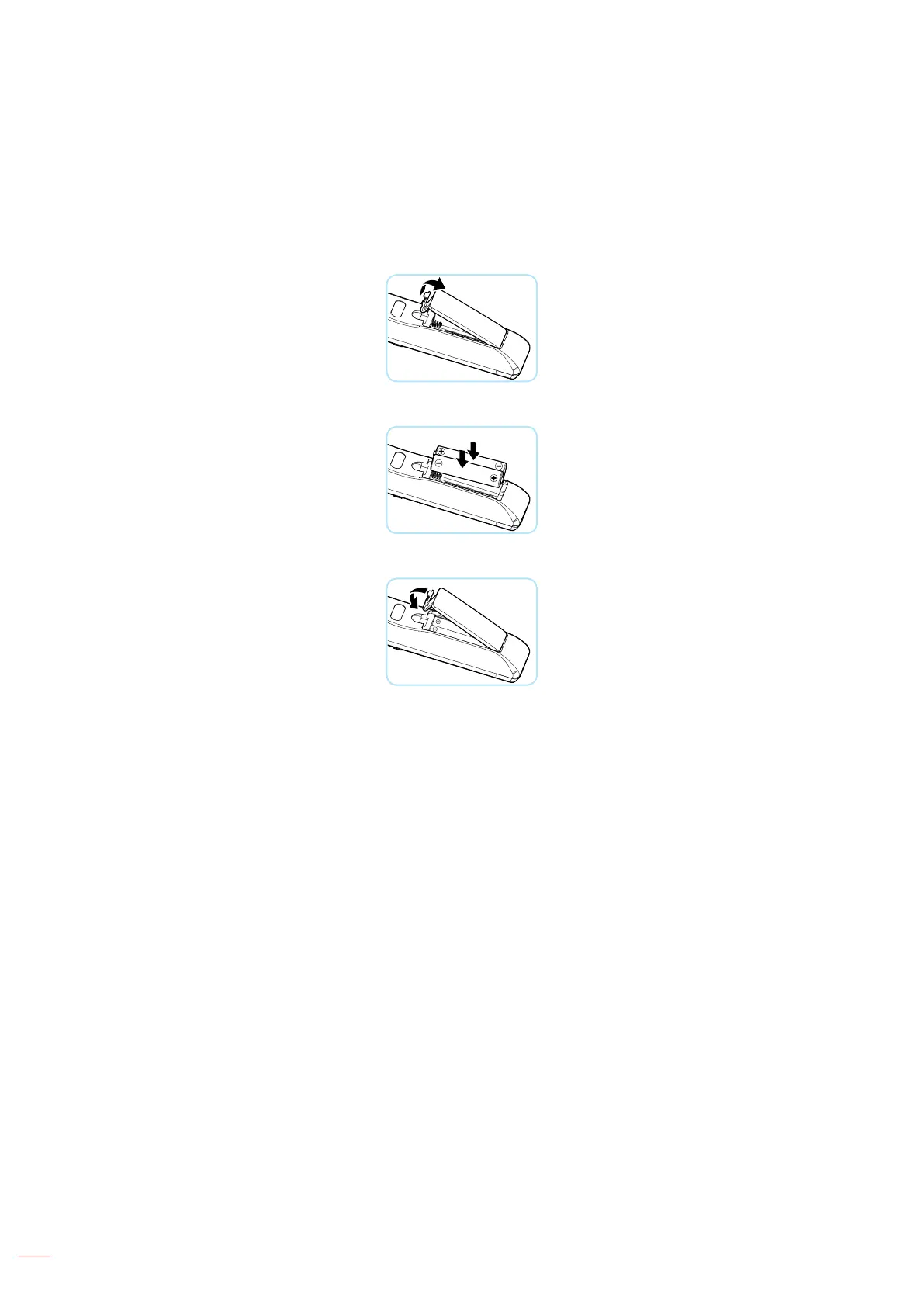
Installing / replacing the batteries
Two AAA size batteries are required. (Not included)
1. Push the clip to release the battery cover.
2. Install new batteries (AAA/R03). Ensure that you have the batteries’ polarity (+/–) aligned correctly.
3. Close the battery cover and press it down until it clicks into place.
Note: Do not mix dierent types of batteries or new and old batteries.
CAUTION
To ensure safe operation, please observe the following precautions:
• Use AAA/R03 type batteries.
• Avoid contact with water or liquid.
• Do not expose the remote control to moisture or heat.
• Do not drop the remote control.
• If the batteries have leaked in the remote control, carefully wipe the case clean and install new
batteries.
• There is a risk of explosion if the batteries are replaced with the wrong type.
• Dispose of used batteries according to the instructions.
• Remove the batteries from the remote control when not using for extended periods.
• The remote control may fail to operate if the infrared remote sensor is exposed to bright sunlight or
uorescent lighting.



 To Next Page