11
10
www.infopia21.com
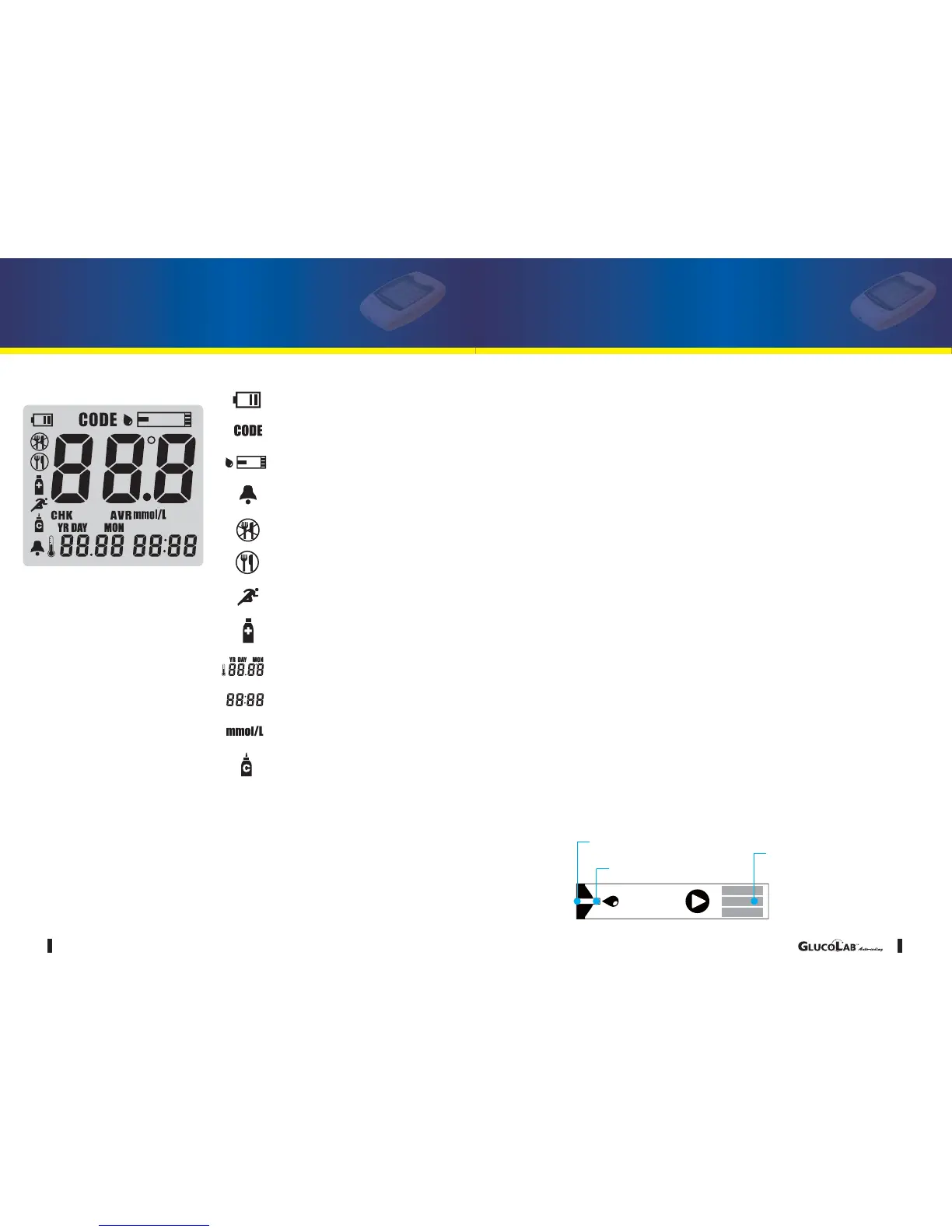
Low Battery Warning Symbol
Strip Code Symbol
Blood drop symbol for test
Alarm Symbol
Before Having a Meal
After Having a Meal
After Sports Activity
After Taking Medication
Temperature / Date
Time / Test Result Amount
Test Result Unit Symbol
Control Solution Symbol
Average Test Result System
GLUCOLAB
TM
Auto-coding Blood Glucose
Test Meter Display
Use only
GLUCOLAB
TM
Auto-coding
brand blood glucose test strips with your
GLUCOLAB
TM
Auto-coding
blood glucose test meter.
Apply Blood Target
Confirmation Window
Contact Bar
?
?
?
GLUCOLAB
TM
Auto-coding Blood Glucose
Test Strip Information
Storage and Handling Caution
1. Keep out of direct sunlight.
2. Store the GLUCOLAB
TM
Auto-coding Blood Glucose Test Strip vials in a cool,
dry place between 2-30°C (36-86? ). Do not freeze.
3. Make a note of the discard date on the vial label when you first open it.
Discard remaining GLUCOLAB
TM
Auto-coding blood glucose test strips 3
months after first opening the vial.
4. Close the vial cap tightly immediately after removing a GLUCOLAB
TM
Auto-
coding blood glucose test strip.
5. Do not use test strips after the expiration date printed on the package or vial
as this may cause inaccurate results.
6. Avoid getting dirt, food or water on the blood glucose test strip. Do not bend,
cut, or alter the GLUCOLAB
TM
Auto-codingblood glucose test strip.
7. GLUCOLAB
TM
Auto-coding blood glucose test strips are for single use
only.
8. Keep the blood glucose test strip vial away from children.
9. Please refer to the user’s manual for GLUCOLAB
TM
Auto-coding blood glu-
cose test strip for additional information.
10. Discard the used blood glucose test strip carefully, to prevent any infection.



 To Next Page