17
AXIUM DX8000
07/11
Copyright© 2023 Ingenico –
Banks and Acquirers International Holding SAS
All rights reserved
4.5.2 Installing the battery
WARNING
Switch off the terminal prior to installing a paper roll. Use only
paper approved by Ingenico.
The use of no-approved paper is likely to damage the printer of
your terminal.
When does the battery need to be charged?
How can the battery be charged?
Using the power adapter
Connect the power adapter to the terminal USB type-C
connector located on the left side of the terminal.
Connect the power adapter to the power supply mains network.
Check the charing status on the top of the screen(it means
battery charging).
4.5 Battery
4.5.1 Charging the battery
WARNING
Check that the terminal is not connected to the main electric
network.
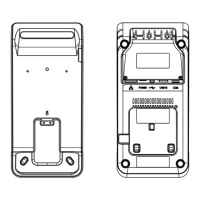
Turn your terminal and unclip the battery door by pushing the clips as
shown with the arrow on the picture.
Disengage the battery door.
For safety reasons, the battery included with the terminal is not
fully charged. Please charge the battery before use.
When used daily, the terminal charges its battery each time the
power adapter is connected. Charging starts automatically.



 To Next Page
 Loading...