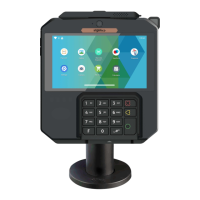
2.3 Keypad Functions
Three physical keys on the left side of the terminal: a power button and two
volume keys.
If the terminal has a 5.99 inch screen,there are three virtual keys at the
bottom of the screen: Menu,Home and Back keys.
If the terminal has a 5.5 inch screen,there are three capacitive keys at the
bottom of the screen: Menu,Home and Back keys.
The AXIUM DX8000 is equipped with touch panel that allows you capture
functions and menus by your finger .
2.4 Touch Panel
Back
Power button Volume Keys
Home
Menu
8
AXIUM DX8000
07/11
Copyright© 2023 Ingenico –
Banks and Acquirers International Holding SAS
All rights reserved



 To Next Page
 Loading...