EasyManua.ls Logo

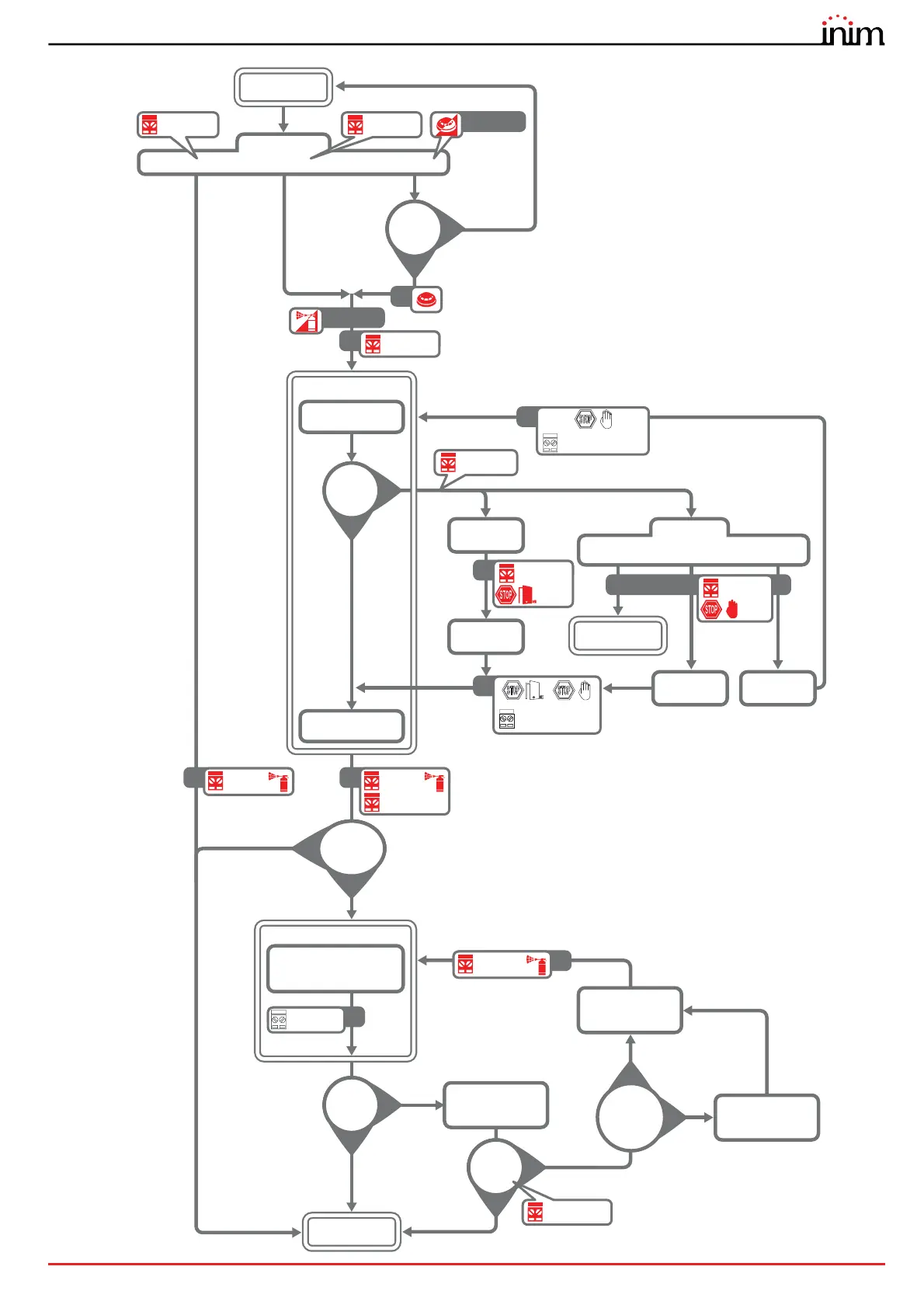
INIM PREVIDIA COMPACT - Extinguishment Operation Flowchart

INIM PREVIDIA COMPACT
28 pages
Print Icon
To Next Page IconTo Next Page
To Previous Page IconTo Previous Page
Loading...
Installation manual
General description 13
Blinking
ON
ON
YES
NO
OFF
YES
NO
ON
OFF
ON
ON
ON ON
Pre-extinguishment
time started
Pre-extinction time
terminated
Condition
sufficient?
Stop
extinction
?
PRE-
AUTOMATIC
“EXTERNAL
“EXTERNAL
Deactivation
STOP “ABORT”
mode
“HOLD”
Activation
“ADD”
Activation
“ABORT
MANUAL
“HOLD
Deactivation
“ADD”
Deactivation
Stand-by
from flow sensor
ACTIVATION
Manual Automatic
Flow switch
Manual
extinction
Pre-
Extinguishing
Stop
extinction
Stop extinction
active
Stop extinction
active
Stop
extinction
active
Stop
extinction
active
Electro
valve
Release
Blinking
Release
Flash
ON
ON
YES
NO
OFF
YES
NO
OFF
Pre-discharge time
started and
terminated
Interval expired
between two
discharge procedures
Pressure
switch
activated?
Verify?
Gas discharged
Discharge time started
and terminated
DISCHARGE GAS
Electro
valve
Electro
valve
YES
NO
Number of
attempts ≥
value set?
“Failed
confirmation”
fault
Confirm from
pressure switch
ON
YES
NO
Pulse
Electroval
ve?

Related product manuals