Inner Range Inception Security Controller Installation Manual. Rev. 6.0
© 2016 - 2023. Inner Range Pty Ltd.
16 www.innerrange.com
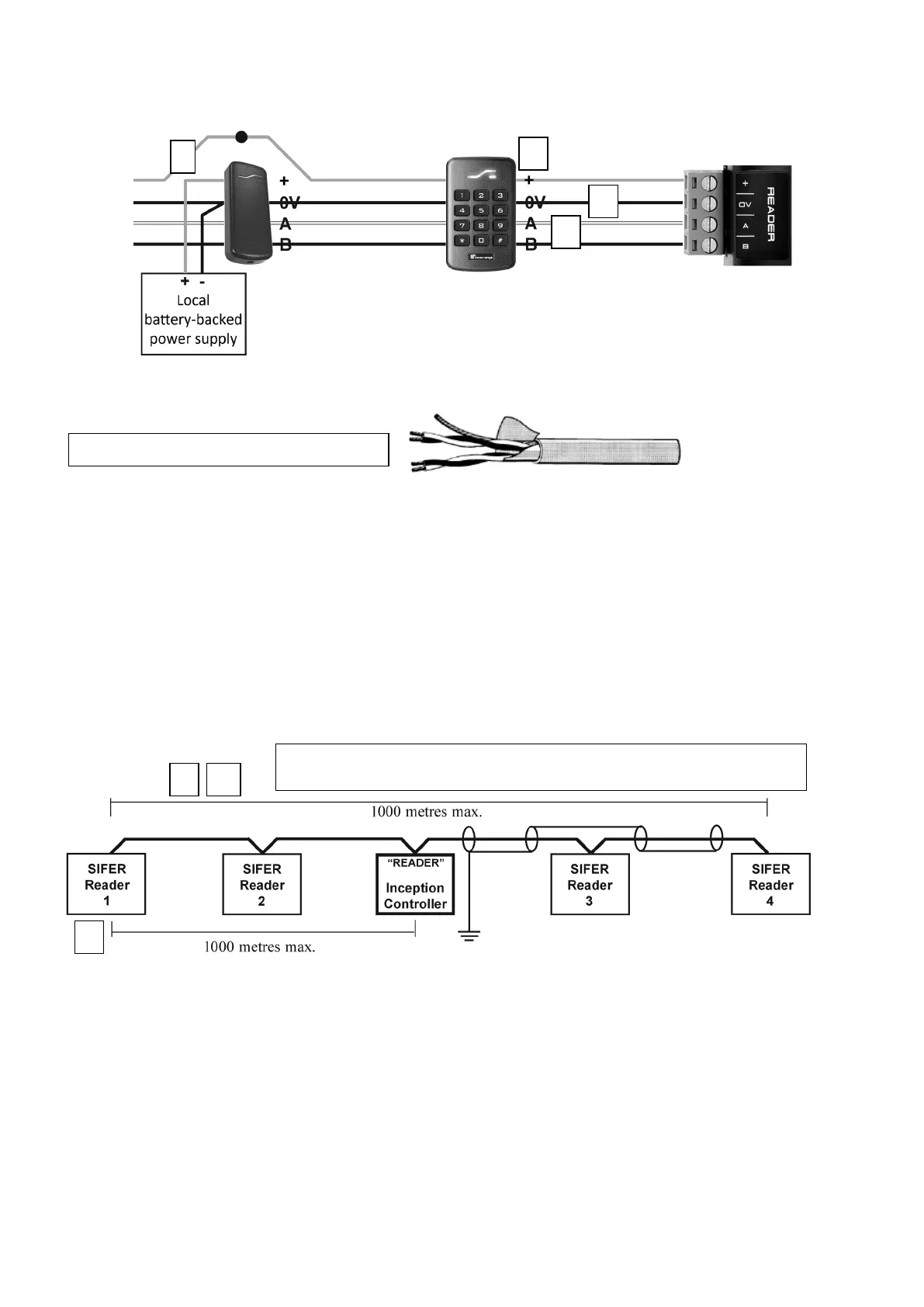
SIFER, SIFER-Keypad or OSDP Reader wiring detail
NOTES:
1) Other RS485 devices such as LAN Isolators & Fibre Modems must not be connected to the
Reader RS485 port.
2) If using 3
rd
Party OSDP Readers, refer to the document ‘Inception Tech Guide – OSDP Readers’
and the OSDP Reader product installation documentation.
SIFER, SIFER-Keypad or OSDP Reader connection overview
[6] Shielded, twin, twisted-pair data cable
[I] Any Reader more than 320 feet (100m) from the Controller may require
a separate local battery-backed power supply &/or heavier gauge cable.


 To Next Page