49
MAINTENANCE
• the dates and results of the checks,
•
• any quantities added or recovered during servicing,
If needed, a form is available at in the manual of the
combined external unit.
Filling the refrigeration circuit with a refrigerant other
refrigerant gas can cause serious damage to the unit.
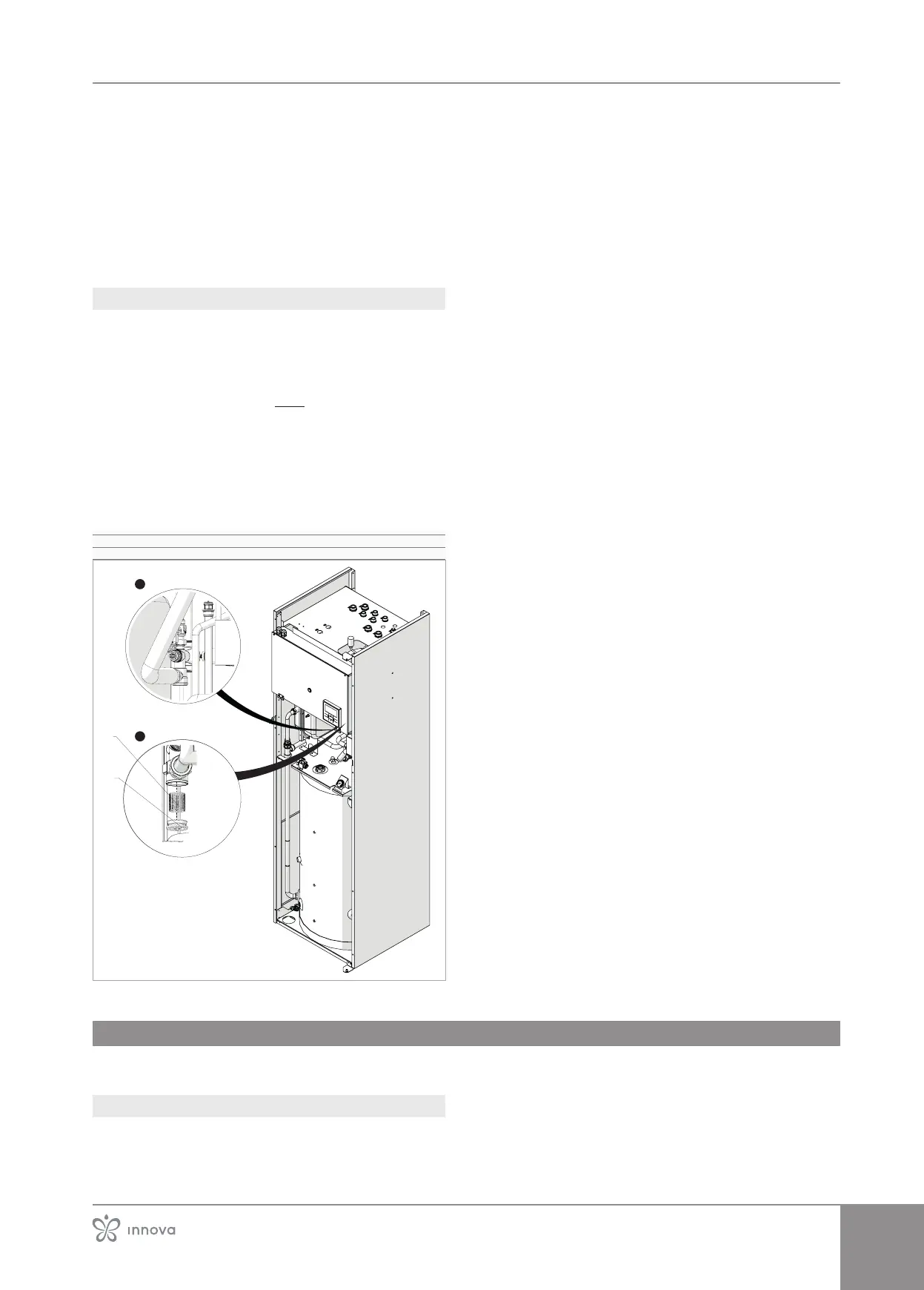
5�2�2 Cleaningthenetlter
To access:
– open the access panel
– disconnect the display connector
– remove aesthetic panels
– see chapter "Disassembly and assembly of cosmetic
panels after installation" p.40
–
– rotate the electrical panel
– remove the insulator from the pipe
To extract:
– use an Allen key
– unscrew the end cap
–
1� Filter
2� End cap
2
1
To clean:
–
–
or solvents
– allow it dry
To reassemble:
– proceed in reverse order
5�3 Periodic operations
The routine maintenance plan includes the following clean-
ing operations.
5�3�1 External cleaning
Clean the external surfaces with a soft damp cloth.
Disconnect the unit from the power supply before each
cleaning and maintenance intervention by setting the
Do not use abrasive sponges or abrasive or corrosive
detergents as you might damage the painted surfaces.



 To Next Page