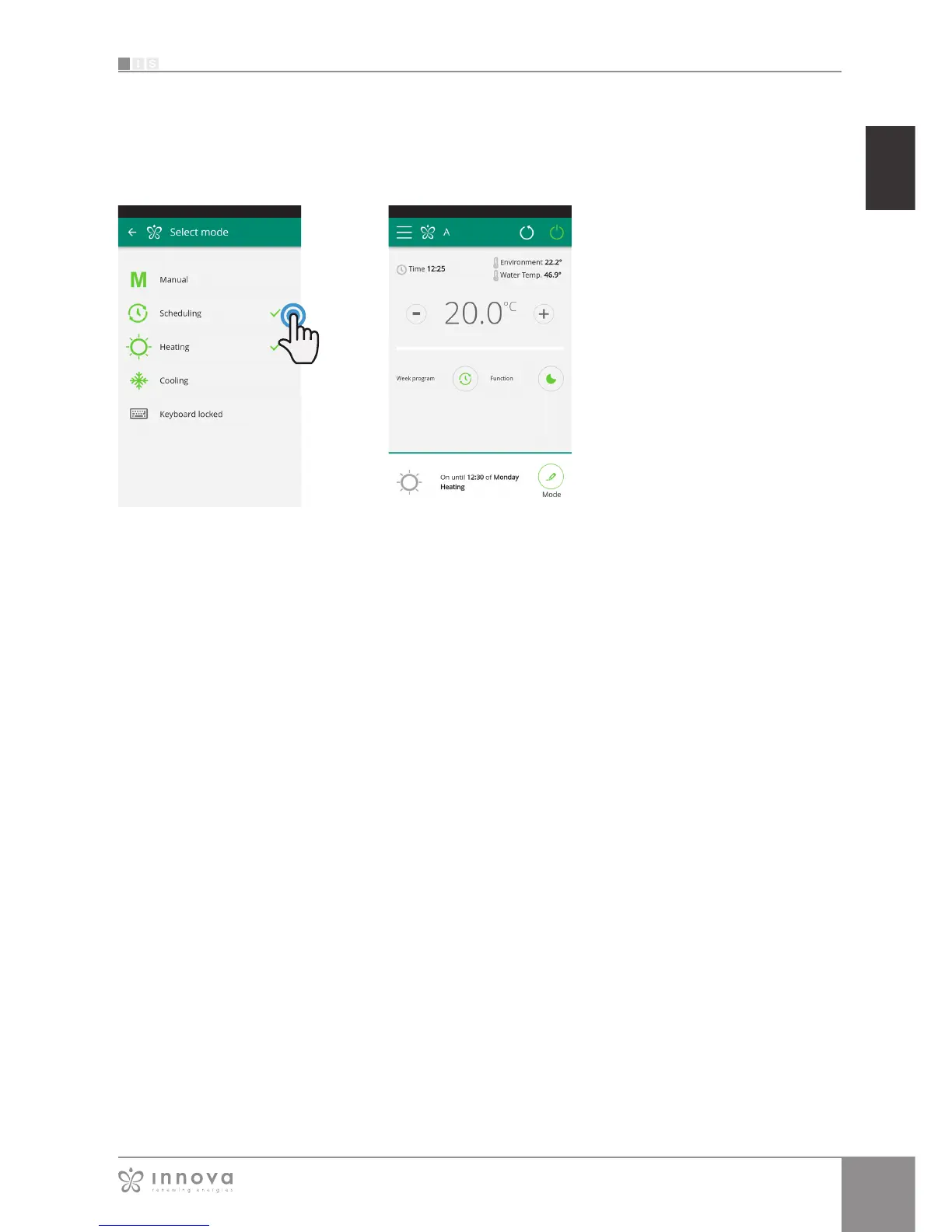
Figure 9-30 Figure 9-31
Note:
Set up a different weekly programming for the heating and
cooling modes.
After completing scheduling, select
the “Mode“ item in the general menu,
then “Programming“. This activates the
weekly program you just created.
Returning to the fancoil's main screen
(Figure9-31, on the lower part, there
are the indication of the scheduling.
If you was in the scheduled shut-down
time, the time of the first fancoil restart
will be showed in the lower part.
To deactivate scheduling and return to
manual mode:
- select "Mode" in the general menu
and then "Manual".
- clicking on the edit icon at the bottom
right of the fancoil general screen.
Note: If the settings are changed
on the fancoil display, scheduling
is disabled and manual mode is
resumed.
If the fancoil is in a place that is open
to the public, where it cannot be
monitored, the display screen lock
can be enabled in order to prevent
unauthorised people from changing
the settings.
Just select “Mode” in the general
menu, then “Keyboard locked”.
(see section 9.7 on page34).








 To Next Page