CHAPTER 2 DICTIONARY
61
2.7.1 General Search
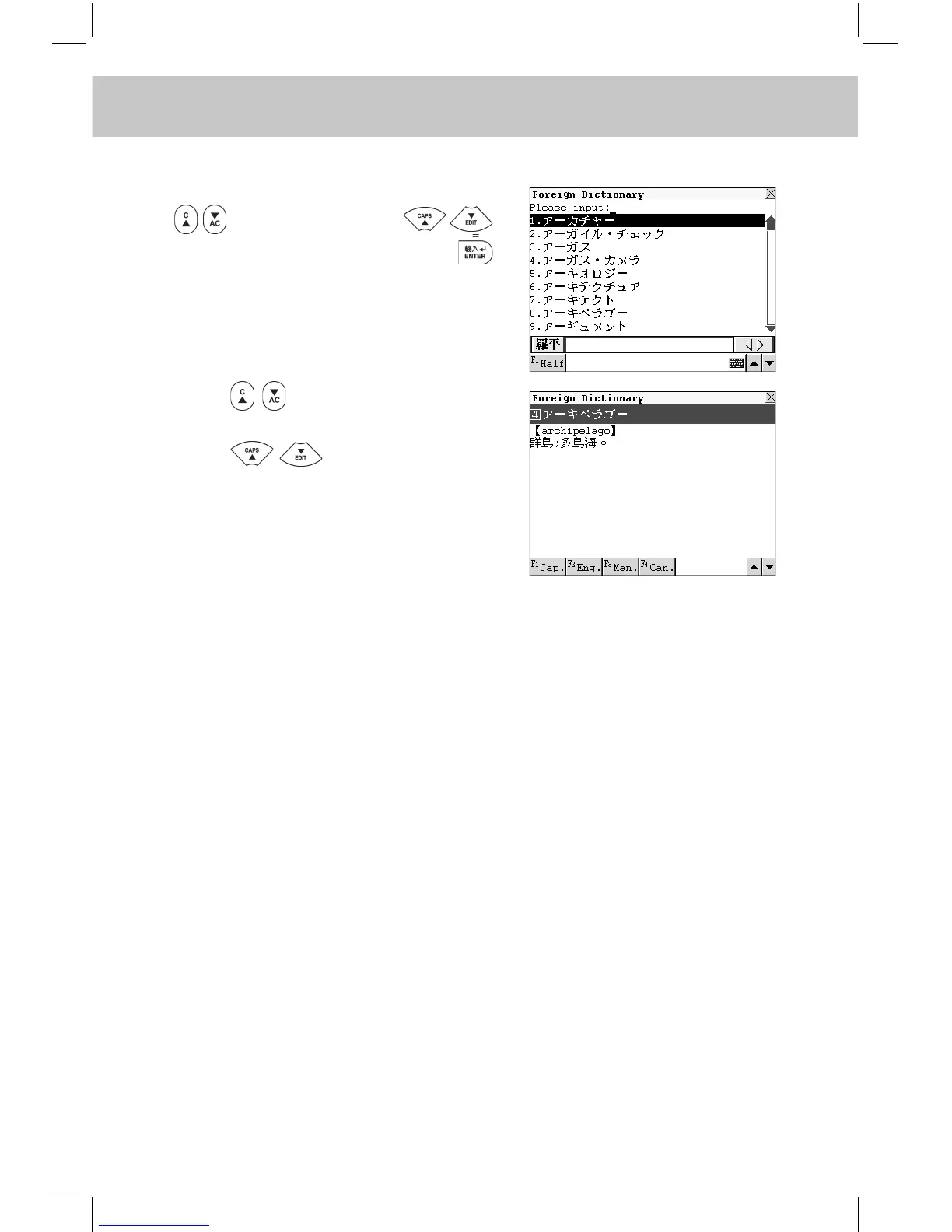
Input the desired word or phrase. Press
to turn page or press
to choose sequentially and press
to conrm (or touch the desired word
from the browse list directly).
Press to view the previous or
next record.
Press to view the content
of the record.
Touch [F1Jap.] to listen to the Japa-
nese pronunciation.
Touch [F2Eng.] to listen to the English
pronunciation.
Touch [F3Man.] to listen to the Man-
darin pronunciation.
Touch [F4Can.] to listen to the Canton-
ese pronunciation.
2.7.2 Nearest Word
-- Please refer to the relevant part of “Eng-Chi Dict.” for details.
2.7.3 Cross-search
In Foreign Dictionary, you can highlight a word to look up its relevant
explanations and the Radical, Stroke, CangJie and PinYin information by
cross-searching to Foreign Dictionary, Eng-Chi Dictionary, Oxford Diction-
ary, Jap-Chi Dictionary, Chi-Eng Dictionary, Chi-Chi Dictionary and Chi-
Jap Dictionary. Cross-search function can be performed unlimitedly.
-- Please refer to the relevant part of “Eng-Chi Dict.” for details.



 To Next Page