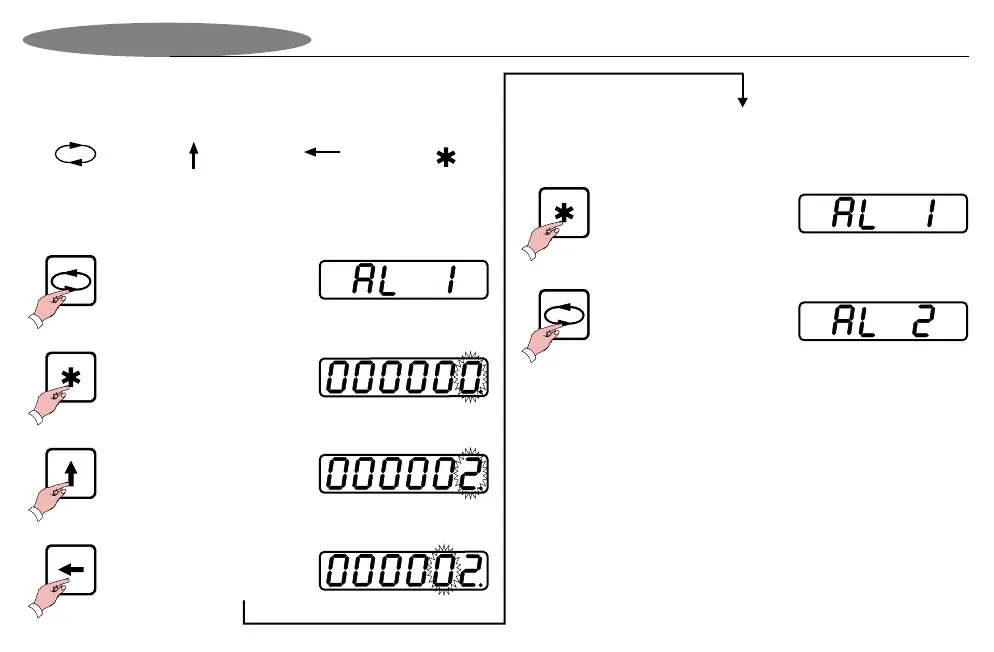
Remember, the symbols on the keypad have the following
definitions during programming.
Press “Menu” for
3 seconds
Next Menu
Item
Increment digit Next Digit
Enter /
Accept value
Press “Next digit” to
amend the next digit
Press “Increment digit”
to increase value
Press “Enter” to see
Alarm / Trip 1 value.
Amend the other digits in the same way until the desired trip
value is entered.
The entire programming menu operates in a manner
similar to the example described above.
Press “Menu” to
proceed to next
trip value.
Press “Enter” to accept
Alarm 1 value.
Setting Up Alarm Values (Option)
Programming Example
Use the same menu steps above to change trip levels
for trip 2, 3 and 4.
Page 11


 To Next Page