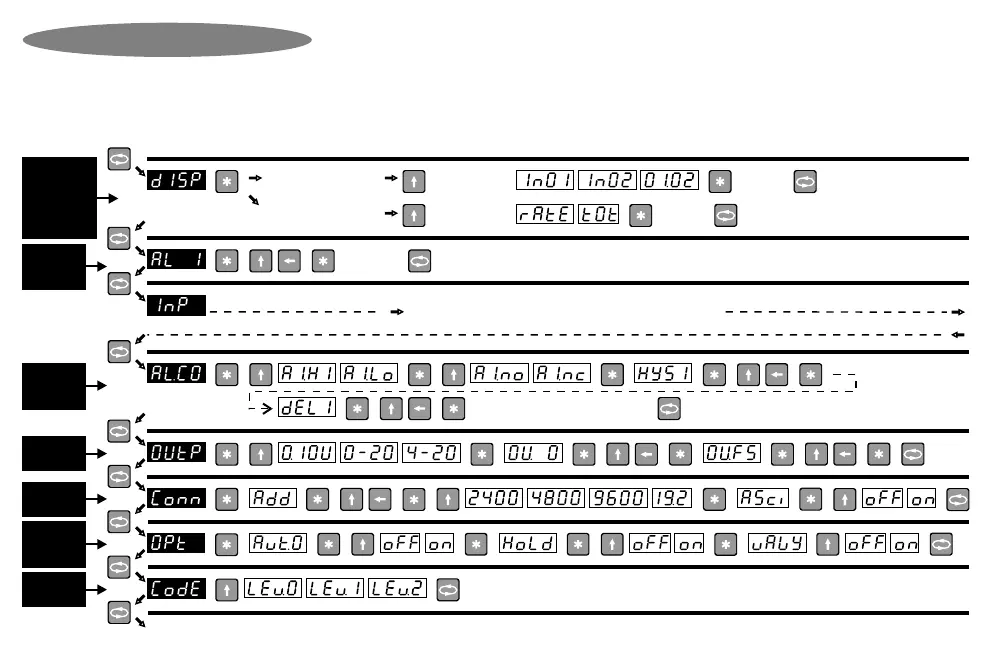
RS485 / 232
only (Option
3002 / 3013)
,, ,,,, ,,
,, ,, ,
,, ,, ,, ,, ,, ,,
,
,,
,
,, ,
,
READ ME FIRST !
,
,,
to toggle the
following options
,
to accept
new value
,
for menu
to accept
new value
,
for menu
,
If ‘pro.f’ is chosen in
input menu, then
If ‘d.tot’ or ‘p.int’ is chosen
in input menu, then
,, , ,
for menu
(Similarly for alarm 2, 3 & 4)
SEE NEXT PAGE for input type selection
“END”. Instrument returns to normal display mode.
to accept
new value
Note 1 : This programming chart is a simplified flowchart for users that have previous experience with this instrument. A programming example is
available in the next few pages to assist new users in understanding this programming chart.
Note 2 : Because this instrument has many options, all possible option menus are shown. Options that are not ordered will not appear in the
programming sequence.
Note 3 : Configuring this instrument requires two steps. (A) Select the correct hardware links (page 6 & 7). (B) Program the instrument with this chart.
Note 4 : To enter programming mode, press the menu key for a few seconds (unless the optional keypad lock has been set). Programming mode timeout
is about 20 seconds. If no key is pressed for 20 seconds during programming, the instrument returns to normal display mode.
, ,, , ,,
Analog output
only (Option
3003 / 3007)
Alarms /
setpoints /
only (Option
3001/4/17/18)
Keypad lock
only
(Option 3025)
START
HERE
Model 5001 /
5001-T / 5600 /
8001 / 8001-T
only, & if ‘pro.f’
or ‘d.tot’ or ‘p.int’
is chosen in
input menu
Programming Chart
(Similarly for alarm 2, 3 & 4)
to toggle the
following options
Alarms /
setpoints /
only (Option
3001/4/17/18)
,
,
,
, ,,, ,,,,,
Auto-zero,
Peak / Valley
hold only
(3012 / 3014)
Page 8


 To Next Page