Hardware overrange. Reduce input signal to reduce saturation.
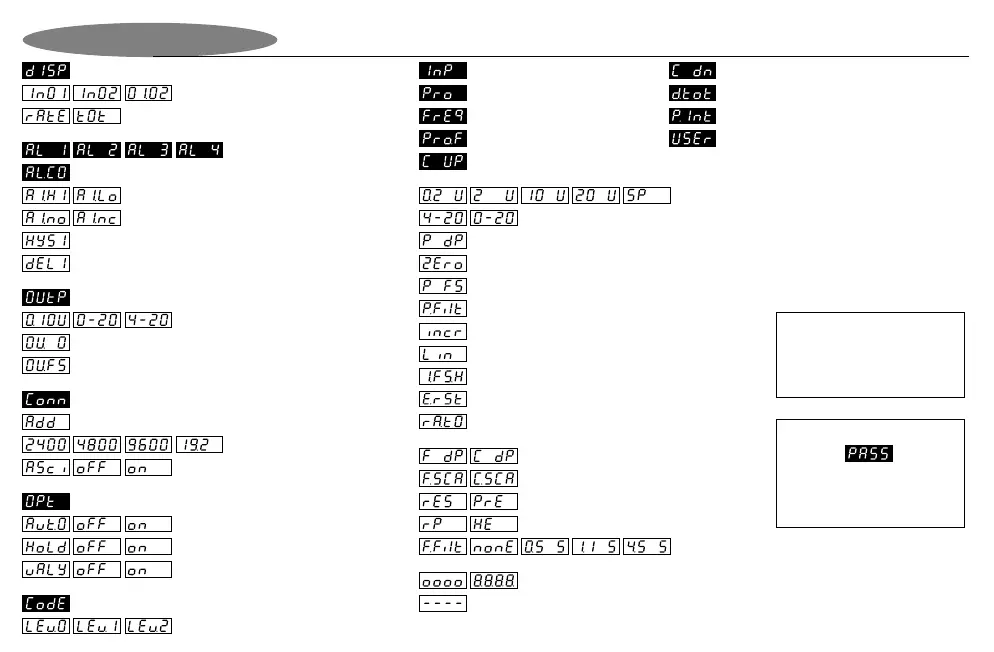
Process input selection (0-20mA, 4-20mA)
Process input selection
(200mV, 2V, 10V, 20V, Special (potentiometer input)
Process decimal point selection (non-floating point)
Process zero display configuration
Process filter - analog inputs (factor 0.0 to 9.9 secs)
Frequency / counter decimal point selection
Frequency / counter scaler (multiplier)
RPM or Hz selection
Filter for frequency input (none, 0.5, 1.1, 4.5 seconds)
Output selection (0-10V, 0-20mA, 4-20mA)
Analogue output menu
Protocol selection. On = AsciiBus. Off =
DigiBus.
Process overscale. Input has exceeded full scale value. / Display test mode.
Display value selection menu
Process, freq, or process x freq input
Rate or totaliser display
Process input
Frequency input
Process x frequency input
Up counter input
Digital input rate & totaliser
Input selection menu
Output zero selection
Output full scale selection
Unit address (default 0)
Counter reset / preset
Display Codes Explained
1st, 2nd, 3rd, 4th setpoint value
Alarm configuration menu (shown for 1st alarm only)
1st alarm setpoint select HIGH / LOW alarm
1st alarm setpoint normally OPEN / CLOSED contact
1st alarm setpoint hysteresis
1st alarm setpoint delay
Communications menu (RS232 / RS485)
Peak OR valley hold. “off” = peak. “on” = valley
Available baud rate values
Process input integration / totaliser
User input for Option 3024 manual setpoint station
Configure digital input as external totaliser reset
Process integration full scale rate hour setting
Display increment. e.g. '10' would give dummy zero.
Configure digital input as external display rate / total selector
Linearisation menu (on/off) select (optional)
Process full scale display configuration
Auto-zero option turned off or on
Down counter input
Please Note :
If the front keypad has been
locked, then the word “PASS” will
appear. See option 3025 for more
information.
Peak / valley hold option turned off or on
Option menu for Auto-zero feature and Peak / Valley Hold feature
Keypad lock security level. Level 0 = none, Level 1 = alarm value changes, Level 2 = full
Keypad lock security menu. See Option 3025 for more information.
Page 10
Please Note :
Display screens shown in black
are to indicate the beginning of
sub-menus.


 To Next Page