Advanced Operations
En-83
Zone 2 Video Output
By connecting the TV used in Zone 2 and the
HDBaseT(TM) port on the AV receiver with
TIA/EIA568B (both ends) and CAT5e (or higher
category) compatible straight cable, you can enjoy
the audio and video via HDMI on the TV in Zone 2 at
most 100 meters away from the AV receiver.
Tip
• Connect the AV receiver to your TV using an HDBaseT™-
enabled device. Refer to your devices’ instruction manual
for details.
• If you use HDBaseT(TM) in Zone 2, make sure to set
“Zone 2 Monitor Out” to “HDBaseT(TM)” (➔ page 60).
• Video and audio signals from an HDMI input will be output
to HDBaseT(TM).
• The information of connected component appears on a TV
in Zone 2 by pressing Display.
See “Multi Zone” (➔ page 77).
■ Operating on the AV receiver
Tip
• The Whole House Mode function shares the input source of
main room with Multi Zone (➔ page 52).
■ Operating on the remote controller
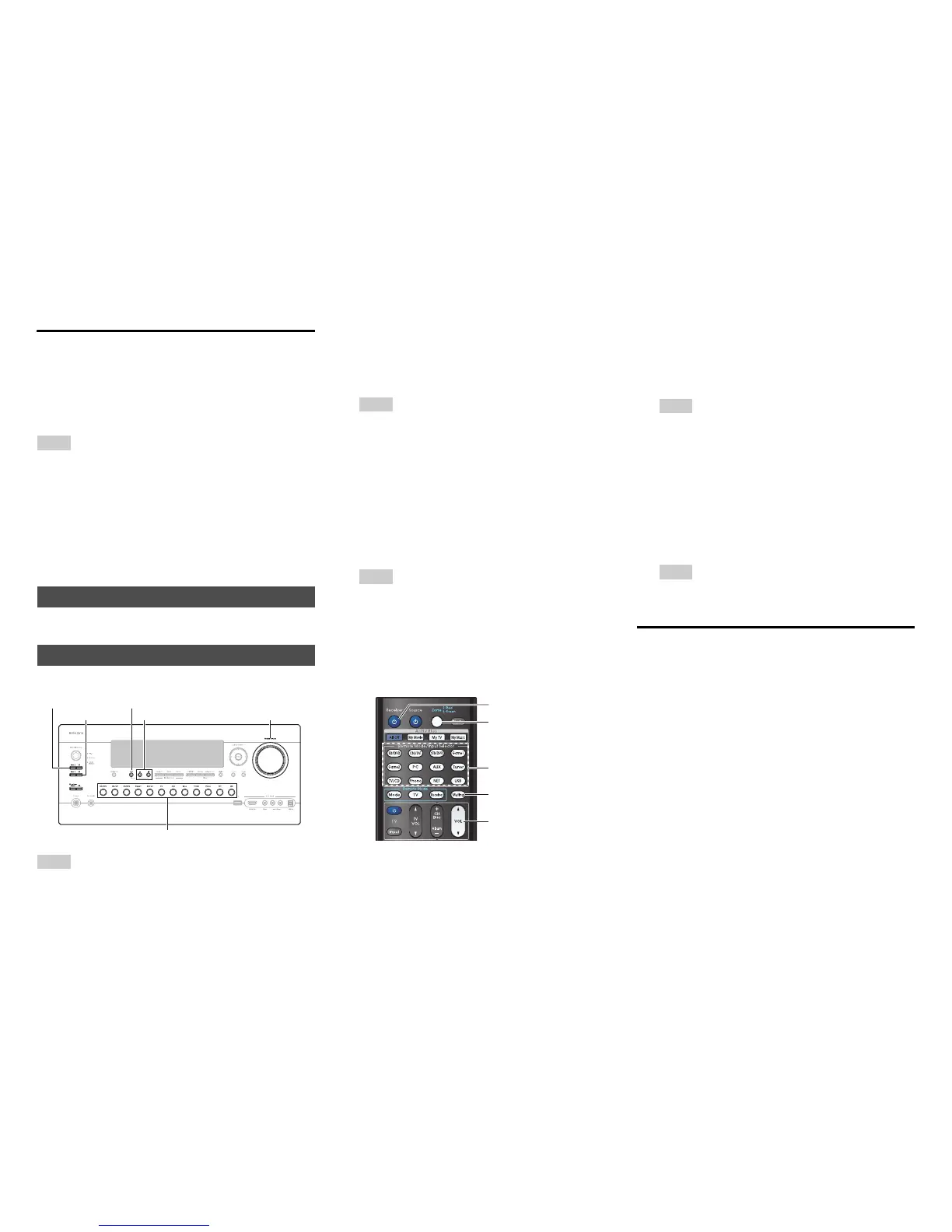
To control Zone 2/3, you must press Zone on the
remote controller first.
Zone turns red when Zone 2 is on, and green when
Zone 3 is on.
Adjusting the Volume for Zones
■ Operating on the remote controller
■ Operating on the AV receiver
If your Zone 2/3 speakers are connected to a receiver
or integrated amplifier in Zone 2/3, use its volume
control to adjust the volume.
Setting the Zone 2/3 Out
Controlling Multi Zone Components
Input selector buttons
Zone 2, Off
Zone 3, Off
Tone
Master Volume
–, +
1
To turn on Zone 2/3 and select an input source,
press Zone 2 or Zone 3 followed by an input
selector button within 8 seconds.
Zone 2/3 turns on, the Z2 or Z3 indicator lights on
the AV receiver’s display.
Tip
• The corresponding trigger output goes high (+12 V).
To select AM or FM, press Zone 2 or Zone 3 and
the Tuner input selector repeatedly.
To select the same source as the main room’s,
press Zone 2 or Zone 3 twice. “Zone 2 Selector:
Source” or “Zone 3 Selector: Source” appears
on the AV receiver’s display.
2
To turn off Zone 2/3, press Off for each Zone.
The zone is turned off.
Tip
• The corresponding trigger output goes low (0 volts).
8Receiver
Muting
VOLq/w
Zone
Input selector buttons
1
Press Zone repeatedly, then point the remote
controller at the AV receiver and press
8Receiver.
Zone 2/3 turns on, the Z2 or Z3 indicator lights on
the AV receiver’s display.
Tip
• The corresponding trigger output goes high (+12 V).
2
To select an input source for Zone 2/3, press
Zone repeatedly, followed by an Input Selector
button.
To select AM or FM, press Zone and the Tuner
input selector repeatedly.
3
To turn off Zone 2/3, press Zone repeatedly,
followed by 8Receiver.
The zone is turned off.
Tip
• The corresponding trigger output goes low (0 volts).
1
Press Zone repeatedly.
2
Use VOL q/w.
1
Press Zone 2 or Zone 3 (the Z2/Z3 indicator on
the AV receiver’s display flashes).
2
Use Master Volume control within 8 seconds.



 To Next Page