Safety Information and Introduction
En-9
See “Connecting the AV Receiver” for connection
(➔ pages 12 to 22).
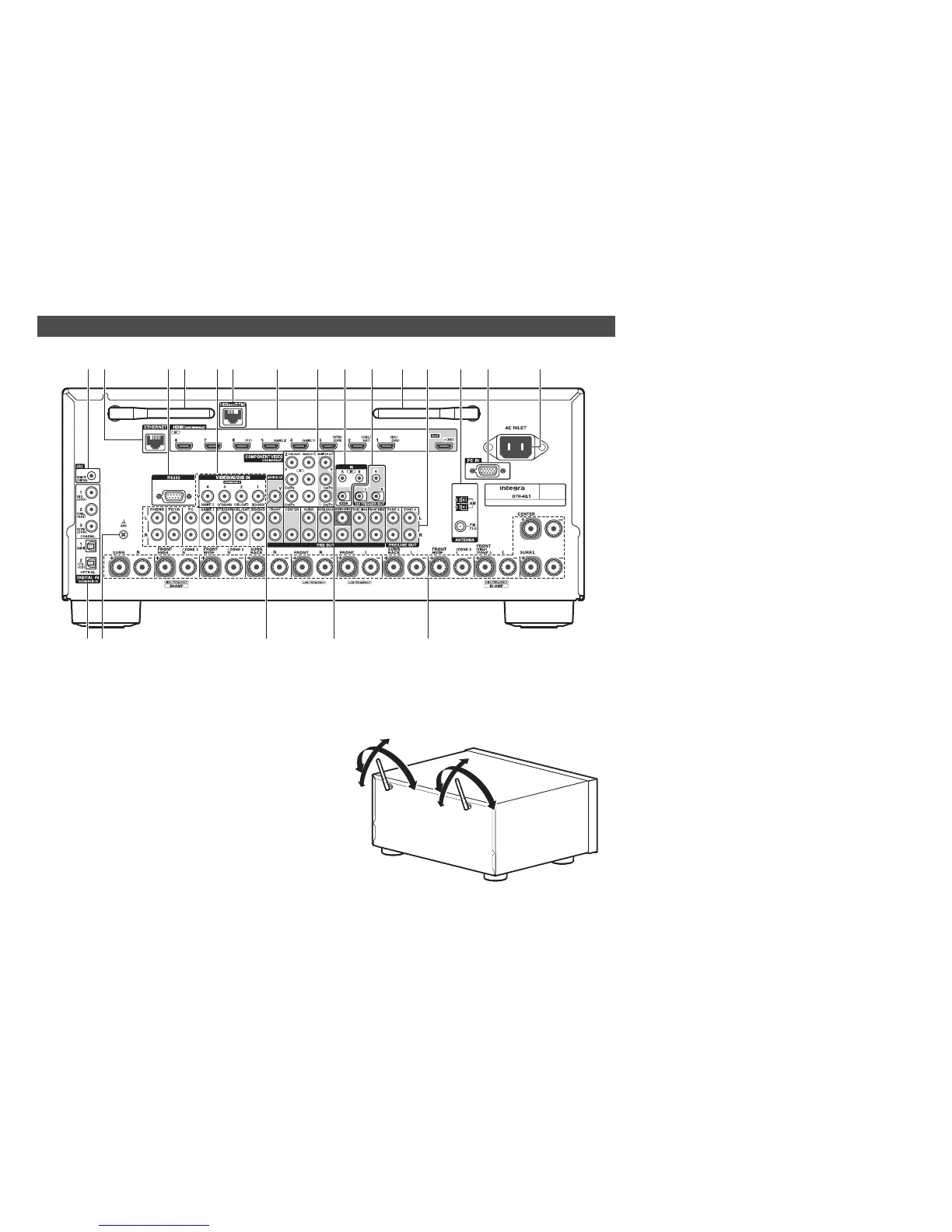
a uREMOTE CONTROL jack
b ETHERNET port
c RS232 port
Terminal for control.
d Wireless antenna
When the AV receiver is connected to the network
by wireless, adjust the position of the antenna
(➔ pages 29, 33).
Rear Panel
op rqs
aec
d d l mbfhgij nk
90°
90°
180°
180°
e Composite video and analog audio jacks
(BD/DVD IN, CBL/SAT IN, STB/DVR IN, GAME 1
IN, PC IN, TV/CD IN, PHONO IN)
f HDBaseT(TM) port (Custom installer use only)
The sticker is placed on this port when purchased.
Remove the sticker before use. Do not connect
this port and an Ethernet port on the network
devices.
g HDMI IN and HDMI OUT jacks
h COMPONENT VIDEO IN and MONITOR OUT
jacks
i IR IN A/B and OUT jacks
j 12V TRIGGER OUT A/B/C jacks
k ZONE 2 and ZONE 3 PRE/LINE OUT jacks
l FM ANTENNA jack and AM ANTENNA terminal
m PC IN jack
n AC INLET
o DIGITAL IN COAXIAL and OPTICAL jacks
p GND screw
q MONITOR OUT V jack
r PRE OUT jacks
(FRONT L/R, CENTER, SURR L/R, SURR BACK
L/R, FRONT HIGH L/R, FRONT WIDE L/R,
SUBWOOFER)
s Speaker terminals
(FRONT L/R, CENTER, SURR L/R, SURR BACK
L/R, FRONT HIGH/ZONE 3 L/R and FRONT
WIDE/ZONE 2 L/R)



 To Next Page