Disassembly
Removing the Optical Device Assembly 2 - 17
2.Disassembly
Removing the Optical Device Assembly
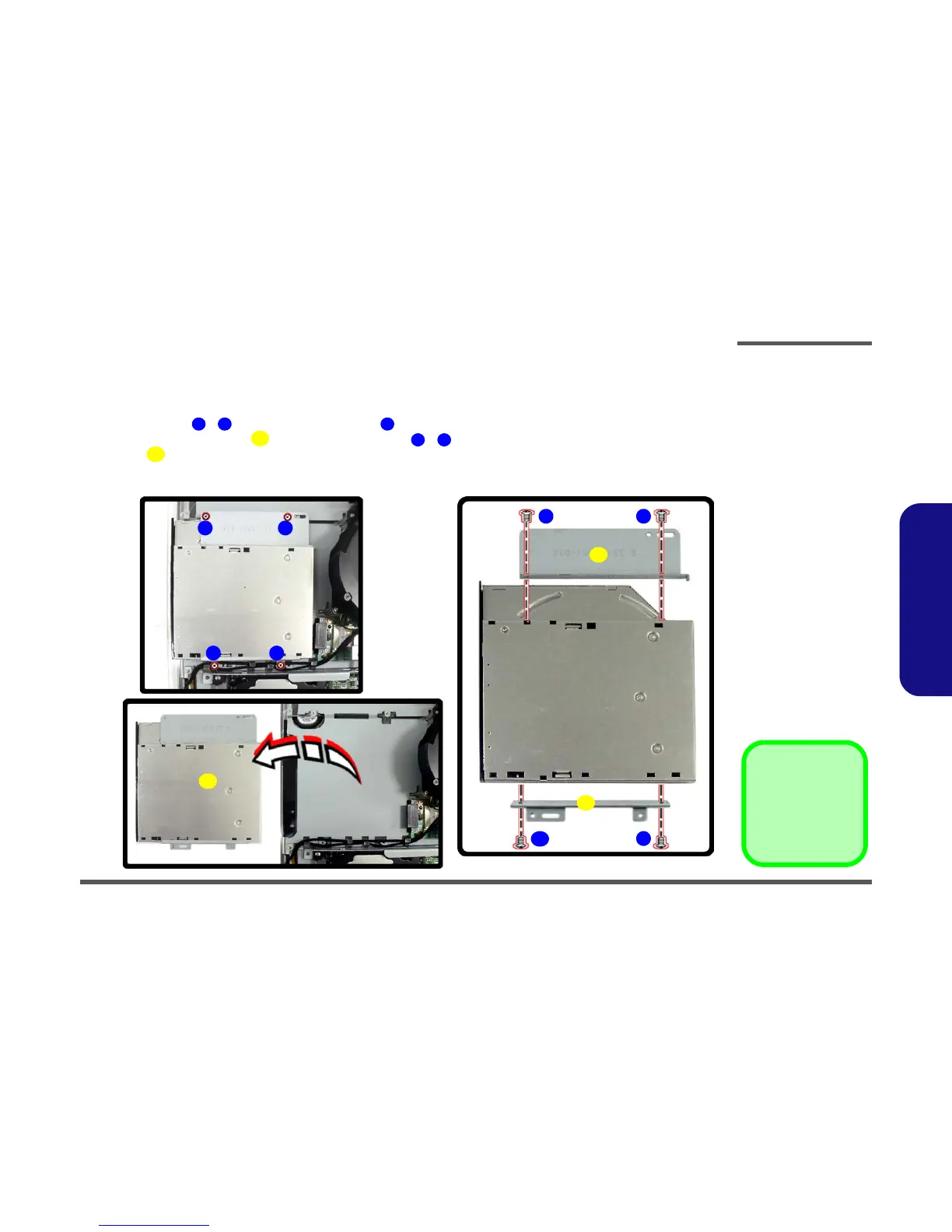
1. Remove the rear component cover (page 2 - 7) USB port and module cover (page 2 - 11) and LCD back cover
(page 2 - 15).
2. Remove screws - , and disconnect connector , from the optical device.
3. Remove the optical device , and remove the screws ( - ) in order to separate the optical device from the
bracket .
4. Reverse the removal procedures to intall the new optical device.
Figure 2 - 12
Optical Device
Assembly
Removal
Sequence
a. Remove the screws
and disconnect the
cable.
b. Remove the Optical
Device.
c. Remove the screws
and separate the
bracket from the op-
tical device.
1 4 5
6
7 10
11
a.
1 2
3
6
4
8
c.
b.
7
9
10
11
11
5. Optical Device
11. Brackets
•8 Screws



 To Next Page