Disassembly
Removing the System Memory 2 - 7
2.Disassembly
Removing the System Memory
1. Turn the computer off and disconnect all peripherals and cables (including telephone lines).
2. Place the computer on a flat stable surface, preferably on a protective covering to avoid damage to the LCD screen.
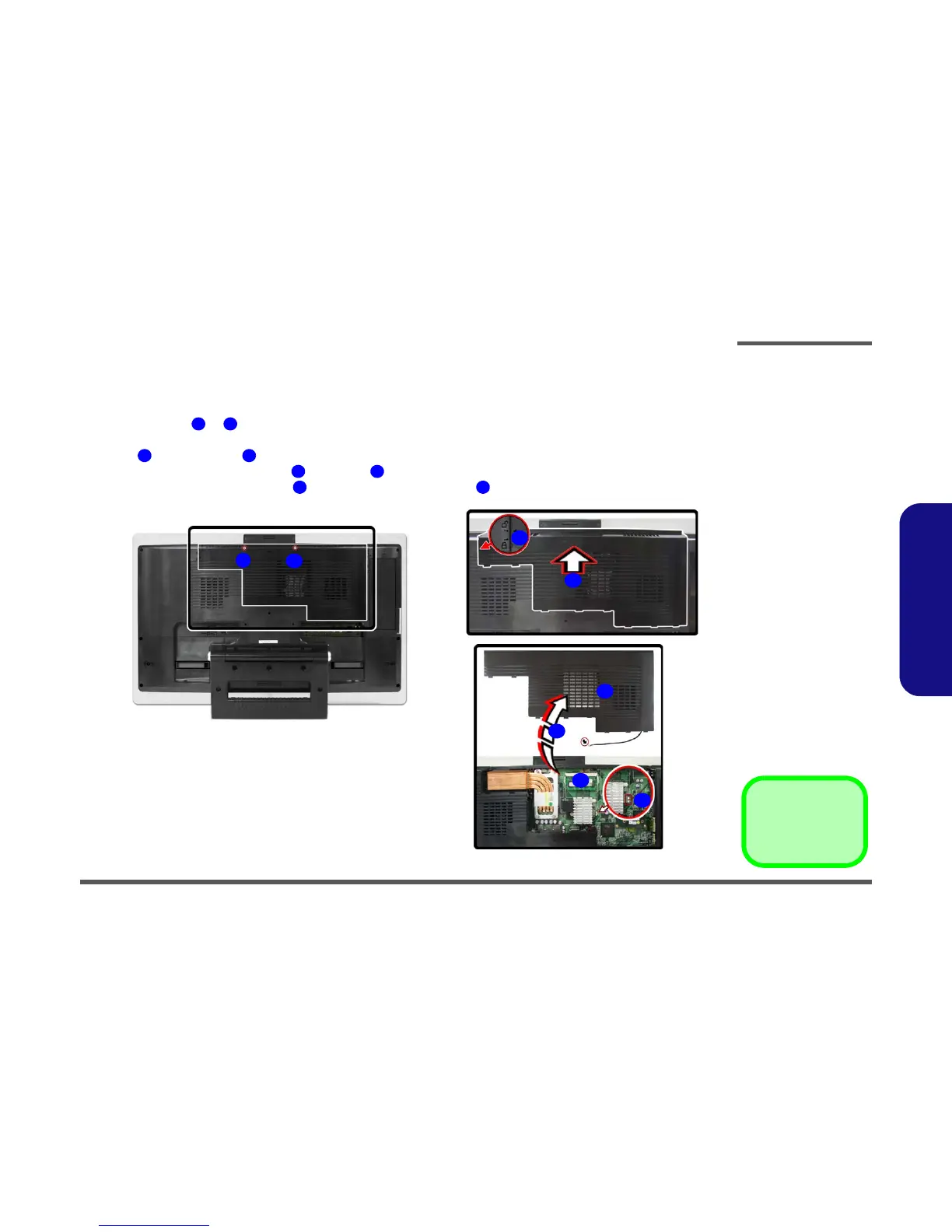
3. Remove screws & from the rear component cover.
4. Carefully (a fan and cable are attached to the under side of the cover) slide the component cover in the direction of
arrow , until the arrow aligns with the unlock symbol.
5. Carefully disconnect the fan cable from point on the mainboard.
6. Remove the rear component cover and locate the memory socket .
Figure 2 - 2
Memory Removal
Sequence (cont’d)
a. Remove the screws.
b. Slide the cover as indi-
cated by the arrow.
c. Disconnect the cable
and remove the com-
ponent cover from the
computer.
1 2
3 4
5 6
7 8
c.
a. b.
1
2
4
3
6
5
7
8
•2 Screws



 To Next Page