17
IV. Browser‐BasedConfigurationInterface
Thebrowser‐basedconfigurationinterfaceenablesyoutoconfigurethe
accesspoint’sadvancedfeatures.Thedevicefeaturesarangeofadvanced
functions,suchasMACfiltering,MACRADIUSauthentication,VLAN
configurations,upto32SSIDs andmanymore.Toaccessthebrowser‐based
configurationinterface:
1.
ConnectacomputertoyouraccesspointusinganEthernetcable.
2.
Enteryouraccesspoint’sIPaddressintheURLbarofaWebbrowser.The
accesspoint’sdefaultIPaddressis192.168.2.1.
3.
Youwillbepromptedforausernameandpassword.Thedefault
usernameis“admin”andthedefaultpasswordis“1234,”thoughitwas
recommendedthatyouchangethepasswordduringsetup(seeII‐2.Basic
Settings).
Ifyoucannotrememberyourpassword,resettheaccesspoint
backtoitsfactorydefaultsettings.RefertoI‐5.Reset.
4.
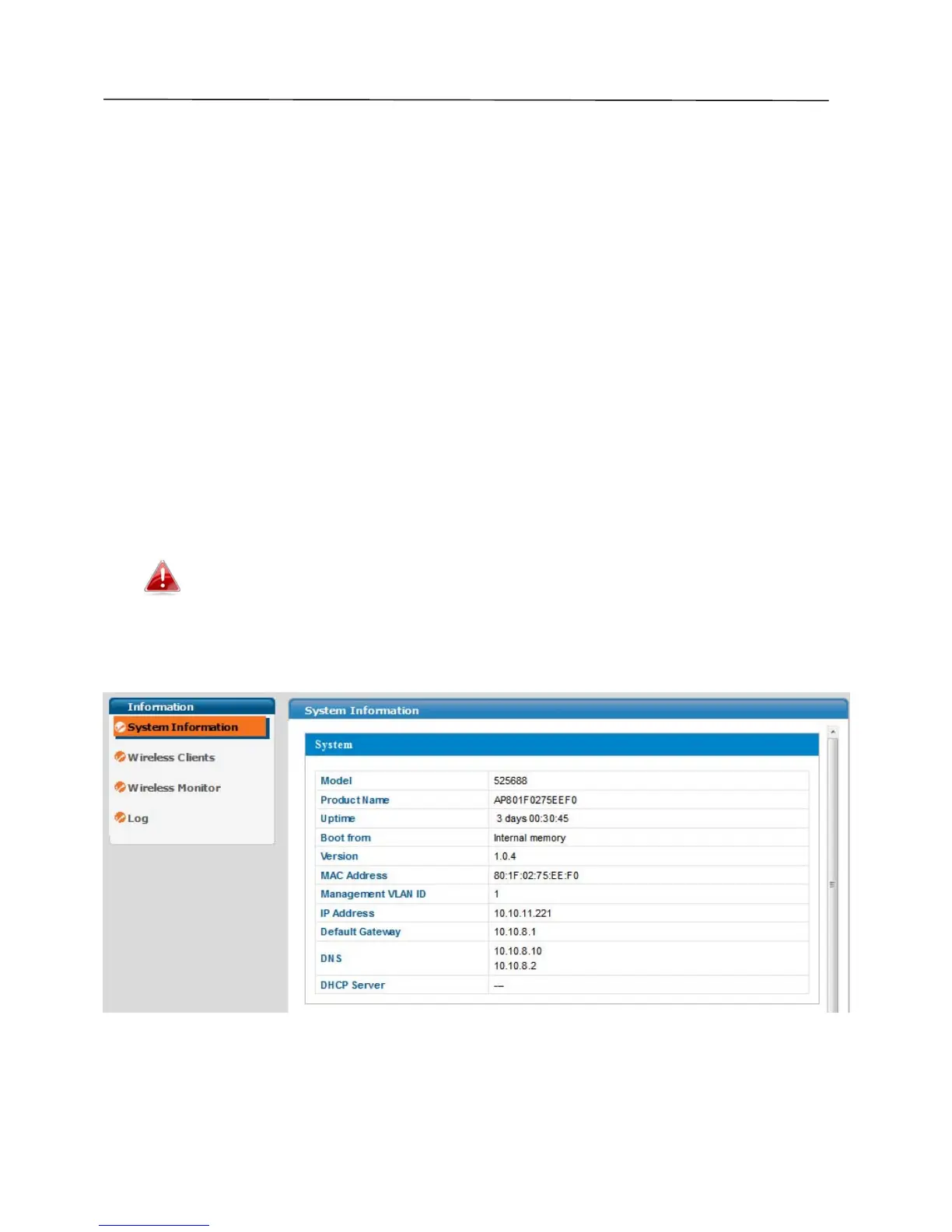
YouwillarriveattheSystemInformationscreenshownbelow.



 To Next Page