12
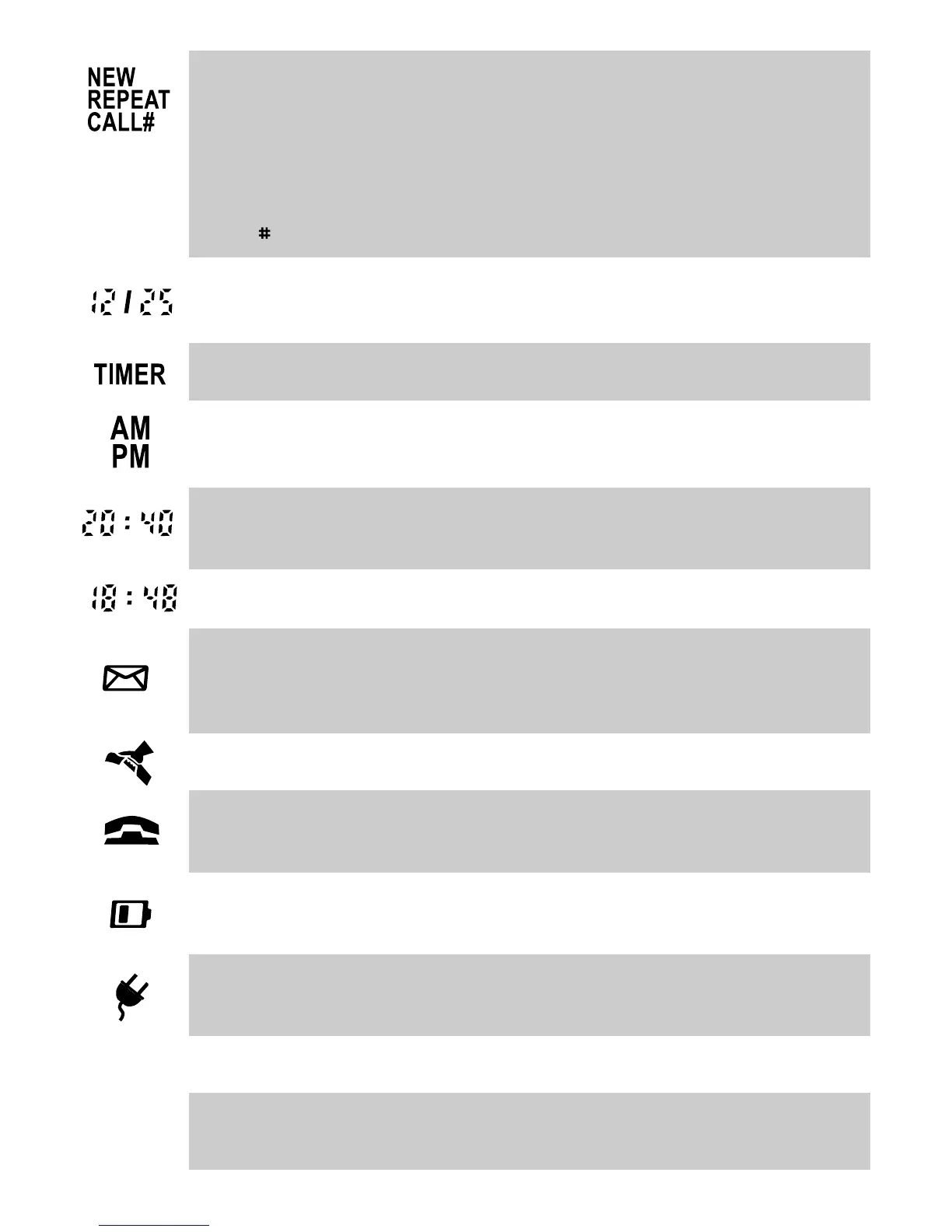
Received Call Status indication;
NEW - new calls have been received that have not previously been reviewed in the
Calls list (the Calls key will also be flashing)
REPEAT - indicates multiple calls have been received from the same caller in the
current Calls list’s history; therefore please note that only the most recent call from
that caller’s number will be retained in the Calls list.
CALL - entry number in Calls list
Date in Month/Day format; shows current date or date of received call when reviewing
Calls list
Indicates Call Timer is active
For the clock readout and when reviewing the time that a call arrived in the
Calls list (displays only in 12 hour mode)
Hour:Minute format for the clock readout and when reviewing the time that a call
arrived in the Calls list (displays only in 12 hour mode)
Minute:Second format in Call Timer mode (maximum count 99:59)
Displays together with “MESSAGE WAITING” text in the name field; to indicate the
presence of message waiting in voicemail system (see “Message Waiting Light
Compatibility” section)
Indicates, when reviewing the Calls list, that the call was answered on the IQ335
Indicates, when reviewing the Calls list, that the call was NOT answered on the
IQ335
If this symbol is visible, the 3 x AA Alkaline batteries in the battery compartment
should be replaced
Will be displayed in the absence of the adaptor power (only functions if batteries are
also fitted and are in good condition)
16 digits for displaying telephone number
16 characters for displaying caller name or number of new calls and total calls
received.
Number
Field
Name
Field



 To Next Page