INSTALLATION
23
NB
17
16
1. If the button is released before the audible buzzer sounds, a system error will be
displayed. In this event you will need to wait 1 minute, until the LED indicators on the
Charging Device stop ashing purple. At this point reinitialise by pressing the
button and wait for the audible beep before entering set-up mode again.
If a second Charging Device is to be connected to
the Remote Display please implement as follows:
I. Unplug the data connector of the existing
Charging Device for the Remote Display.
II. To install the second Charging Device
repeat steps 1 to 13.
III. Once successfully installed reconnect the
original data connector.
IV. The two Charging Devices will now be
displayed as and on the LCD screen.
It is possible to switch between devices by
toggling the button (see operation section).
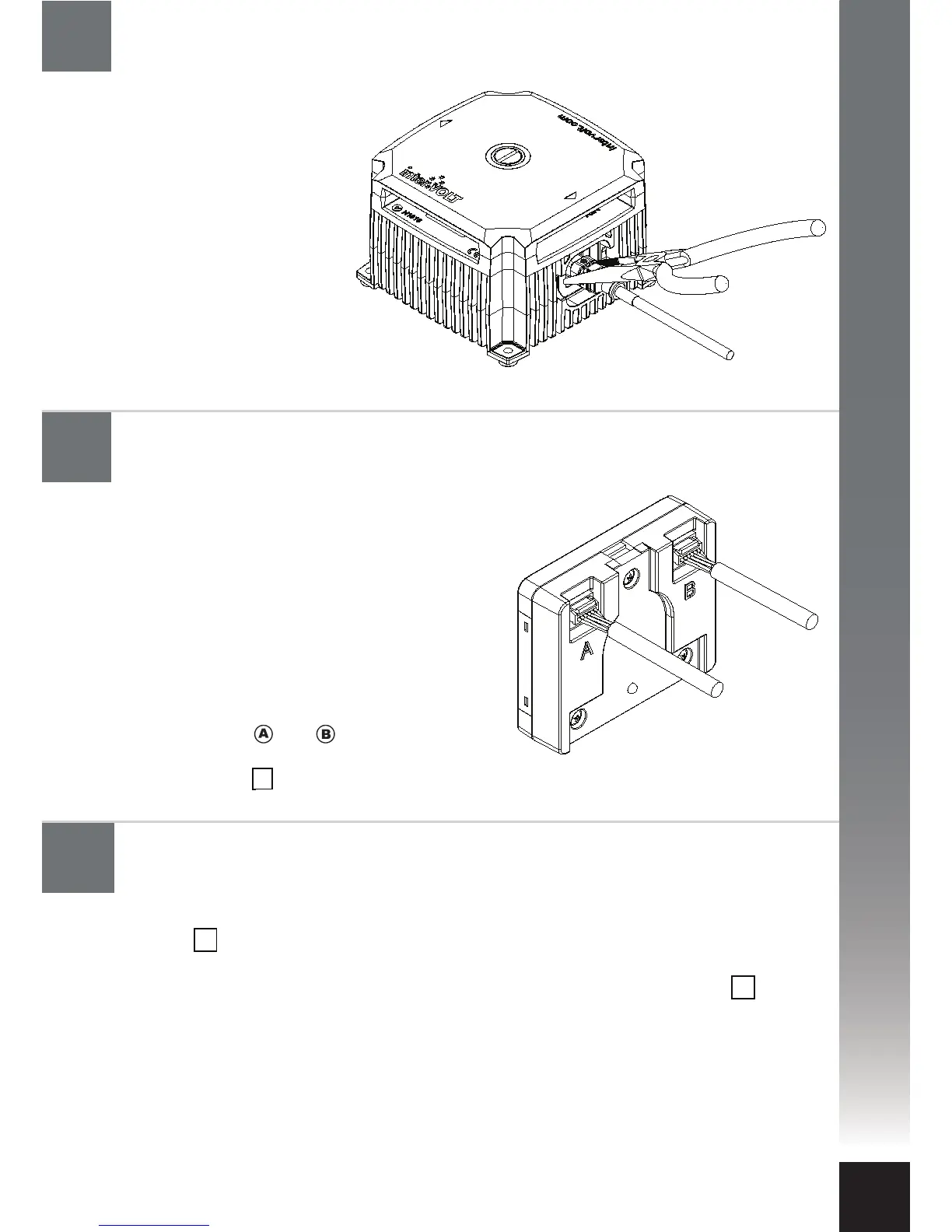
Using a pair of needle nose
pliers, apply a little pressure
to the sides of the Data
Cable plug and gently
withdraw the plug
assembly. As pressure is
applied to the plug the
locking tab momentarily
deforms and is released
from the mating recess.
Notes
Connect a second Charging Device (if available)
Unplugging the Data Cable from the Charging Device.
AB
OK
OK


 To Next Page