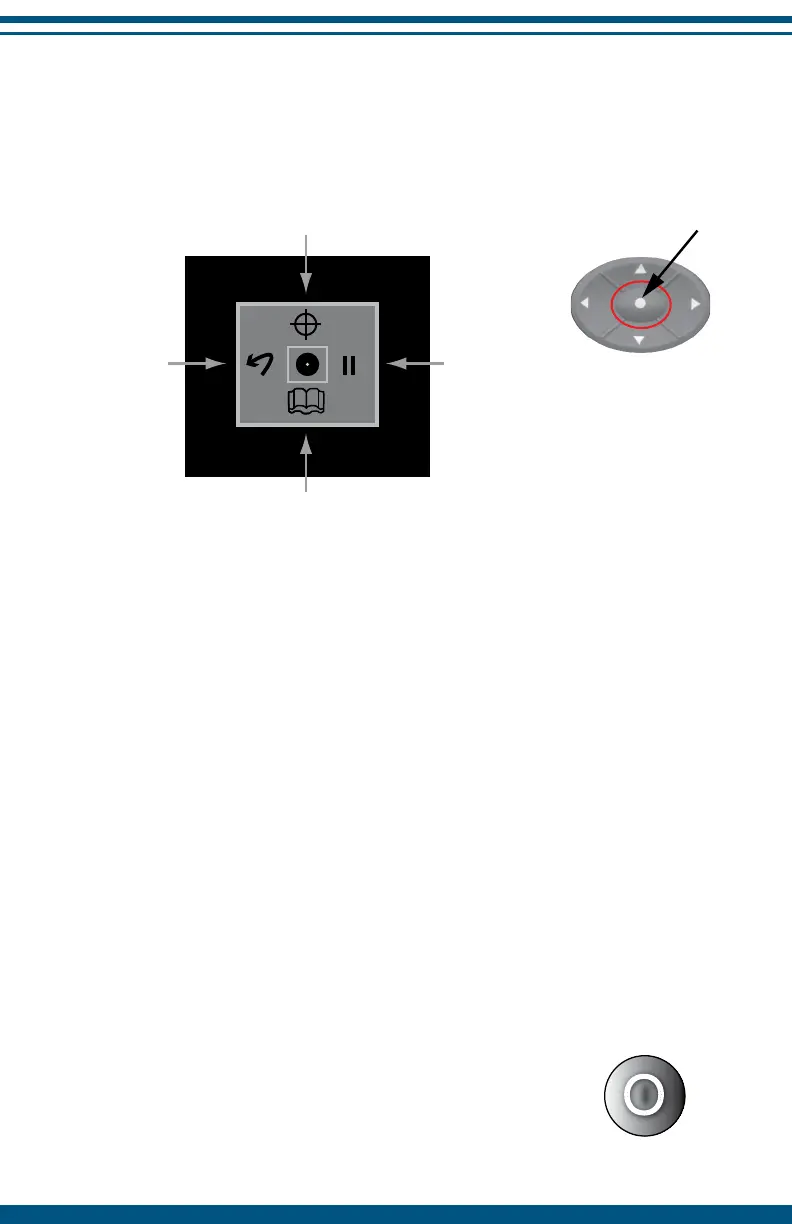
4. Stimulation Screen Navigation Options
While in an active stim screen, press any NAVIGATION button to display
navigation options.
Pause
To pause the operation of the InterX 5002 press any NAVIGATION button
to bring up the navigation screen. Using the right NAVIGATION button
highlight the PAUSE icon and press the SELECT button. The screen will go
blank and stimulation will cease. The green LED will flash to indicate that
the device is in pause mode.
In pause, the most recent stimulation preset used as well as the stimulation
intensity will be saved in memory. To restart the device, press the SELECT
button again.
During active stimulation, if the device does not detect skin contact for one
minute, it will automatically enter pause mode. If you are not in active
stimulation, the device will automatically pause after two minutes if no
buttons are pushed.
NOTE: If the InterX 5002 is not restarted within 60 minutes
after being paused, the device will turn off completely to
save battery power. The LED will stop flashing. It is necessary
to use the ON/OFF button to turn the device on.
11
SELECT
Button
NAVIGATION
Buttons
Condition Specific Preset List is a short list of preset
stimulation patterns recommended for the
selected condition stage (pg. 10)
PAUSE Icon
See below
Go Back to
previous screen
BOOK Icon
Full Preset List is a complete list of
all preset stimulation patterns
(includes setup options - pg. 14)


 To Next Page