5. Set Stimulation Intensity
The Intensity is the strength of stimulation. The patient should experience
a comfortable tingling and vibration at the correct level of stimulation
intensity.
Place the device onto the skin and press the button until a comfortable
stimulation is felt. In any stimulation screen, pressing the or button
sets the intensity of stimulation from a minimum of 2% to a maximum of
100%. The device will emit a buzzing sound that becomes louder as the
stimulation intensity increases.
If the intensity is increased to a level that makes the patient uncomfortable,
reduce the intensity until the patient is more comfortable with the
sensation.
NOTE: The treatment intensity level will vary from patient to patient based
upon individual sensitivity to the electrical impulse and skin impedance. The
sensation may also vary from location to location on the skin of a patient.
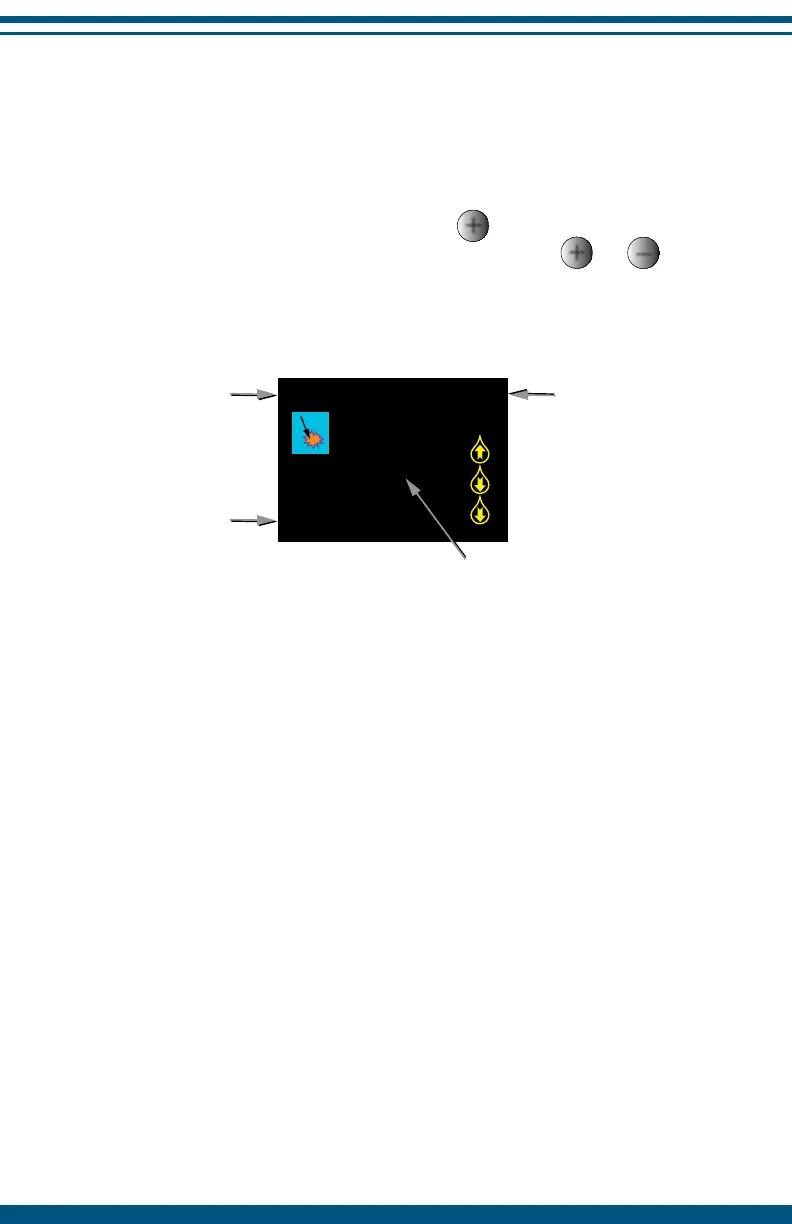
Activity Reading
The icon indicates that the Activity Reading feature is active. The InterX
waveform is sensitive to changes in skin impedance and can be used to
provide a relative measure of tissue impedance between different points on
the skin.
Activity Reading (AR) is an objective measurement of the effect that skin
impedance has on the waveform. This feature of the InterX 5002 can be
used as a guide to identify target treatment areas. See page 20 for further
instructions on use of this feature.
13
180
31
27.5%
0:02
Activity Reading
Time on
skin
Active
Preset
Intensity
level


 To Next Page