4. Establishing Electrode Contact
Electrode placement is determined by multiple factors, including patient
complaint, practitioner experience, tissue response and InterX 5002
readings.
When beginning treatment with the InterX 5002, ensure that the device is in
a preset stimulation screen and the intensity is at the initial default setting of
2.0%. Identify the area of electrode placement as directed in InterX training.
Place the two fixed electrodes firmly on clean dry skin.
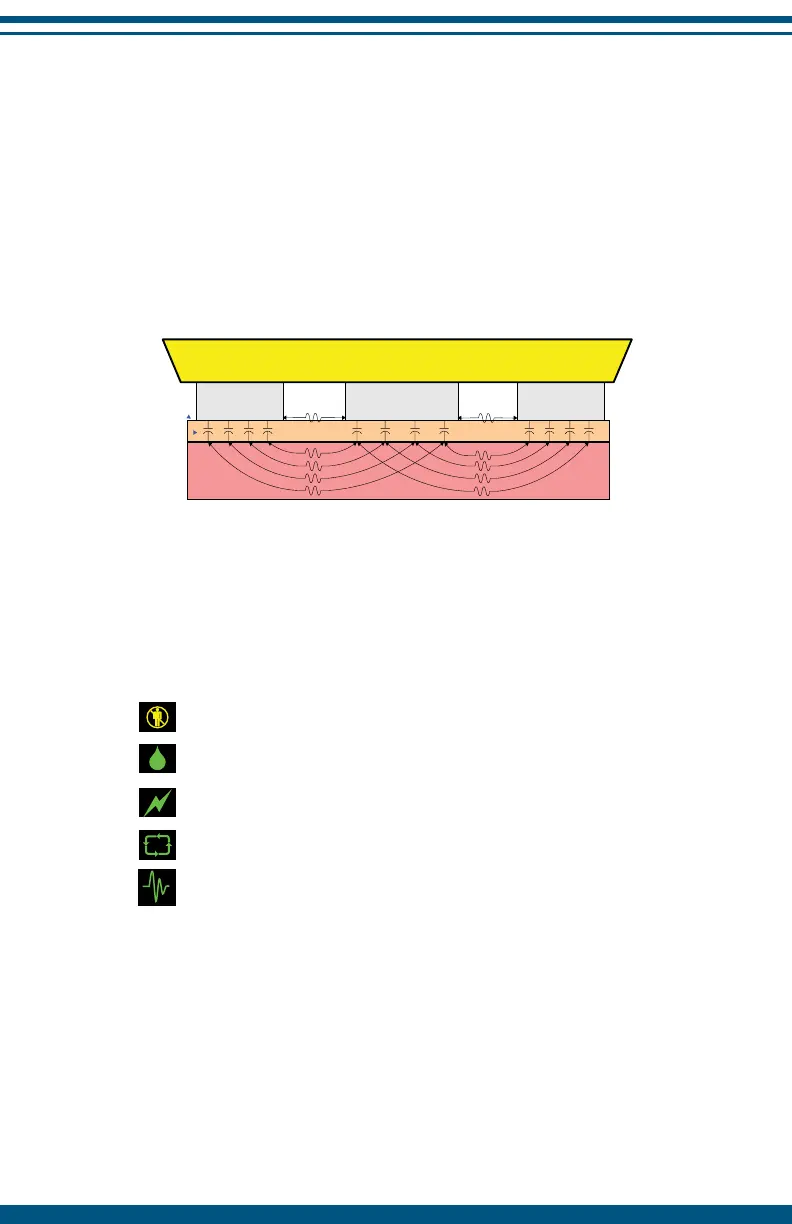
Ensure that the inner and outer electrodes have good contact with the skin
when using the InterX 5002. If the shape of the area being treated causes
poor electrode contact (e.g. fingers, ankles, elbow) use a smaller accessory
electrode with your device to ensure good contact.
NOTE: The most desirable electrode placements are those that provide the
best relief of symptoms while maintaining a comfortable sensation.
The InterX 5002 is designed not to allow more than 10 minutes of continuous
skin contact. The device will pause if the time on skin reaches 10 continuous
minutes without a break.
NOTE: It is recommended that the skin remain in a “natural” condition.
The patient should not use creams or lotions for at least 2 hours before
treatment. Any excess perspiration should be wiped away before using the
InterX 5002.
12
idermis
Outer
Electrode
Inner
Electrode
Outer
Electrode
Dermis
Indicates poor skin contact
Indicates good skin contact in burst or continuous
frequency preset stimulation patterns
Indicates good skin contact in variable preset
stimulation patterns
Indicates good skin contact in cycle preset stimulation
Indicates continuous stimulation regardless of
skin contact in burst or continuous frequency
stimulation patterns. Active only when the comb
electrode is plugged into the device.


 To Next Page