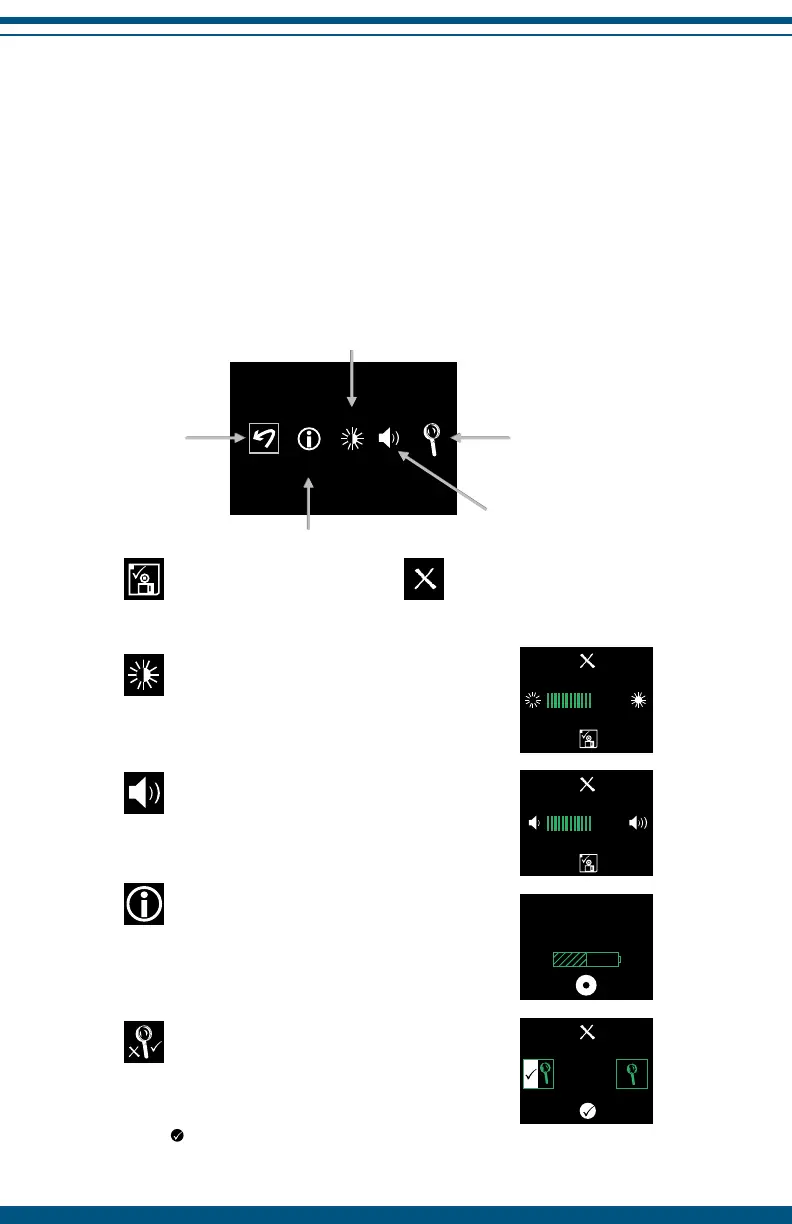
InterX Setup Options
To enter the setup option menu while in a preset stimulation pattern screen
bring up the navigation screen by pressing any button.
Highlight and select the book icon (pg. 14) and select the setup icon on the
right hand side of the full preset stimulation list.
Highlight and select on the right hand side of the screen to enter setup.
24
Save changes Rejectchanges
Screen Brightness
Press the RIGHT or LEFT navigation buttons to change
the brightness of the screen on the InterX 5002.
Volume
Press the RIGHT or LEFT navigation buttons to change
the volume of the ring tones on the InterX 5002.
InterX Sport Device Information
Serial Number (SN), Display Processor version (Dp-v),
Software version (Sp-v), Stim hours (cumulative hours
on skin)
and battery power level.
N O TE: T his screen is informational only.
Go back to
last screen
Device Information
Change volume
Adjust screen brightness
Activity Reading
ON/OFF
NOTE: Failure to select the SAVE CHANGES icon will
result in selected changes being discarded.c
Activity Reading
Press the RIGHT or LEFT navigation buttons to highlight
and select Activity Reading ON or OFF.
Select to accept the change. If the device is
powered OFF, this selection will not be saved.
NRG InterX 5002
SN: 122354
Sp-v1.00 Dp-v1.00
stim hrs: 00000.0


 To Next Page