30
OPERATION AND SET-UP ON THE CONTROLLER
inVENTer Connect controller platform | Operating instructions
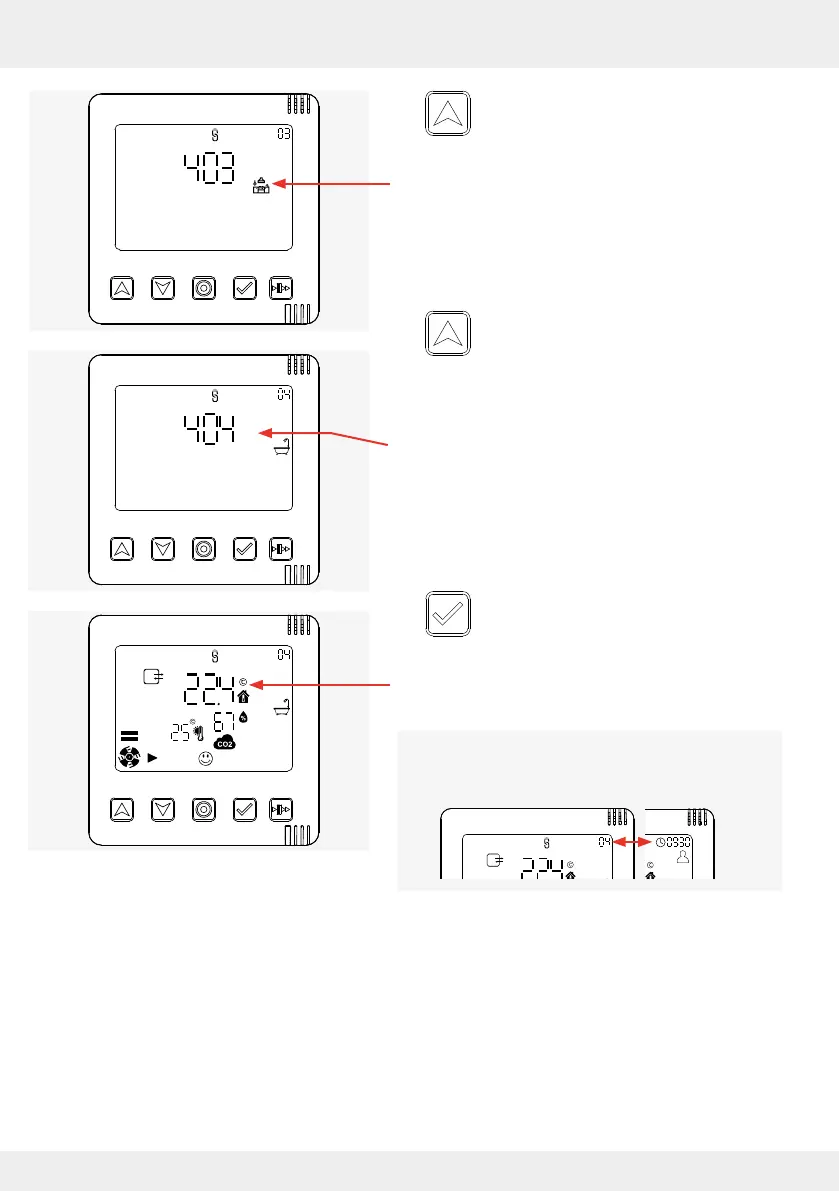
► Use the up arrow key to navigate further
until the next ventilation zone appears on
the display screen.
The next ventilation zone (ventilation zone 3) and
the corresponding prole icon are displayed.
► Use the up arrow key to navigate further
until the next ventilation zone appears on
the display screen.
The next ventilation zone (ventilation zone 4) and
the corresponding prole icon are displayed.
Once the desired ventilation zone is reached:
► Press the select key to conrm the
selected ventilation zone
(here, ventilation zone 4).
The status incl. all relevant measured values of the
selected ventilation zone is displayed.
The displayed number of the ventilation zone
changes with the time display at the top left-hand
edge of the screen.



 To Next Page