36
OPERATION AND SET-UP ON THE CONTROLLER
inVENTer Connect controller platform | Operating instructions
3.6 Activating the boost / pause function globally
The boost / pause function can be activated for the entire system or specically for each ventila-
tion zone. This chapter describes how to activate the boost/pause function for the entire system.
The procedure for activating the boost / pause function only for a specic ventilation zone can be
found in 3.7: Activating the boost / pause function by zone.
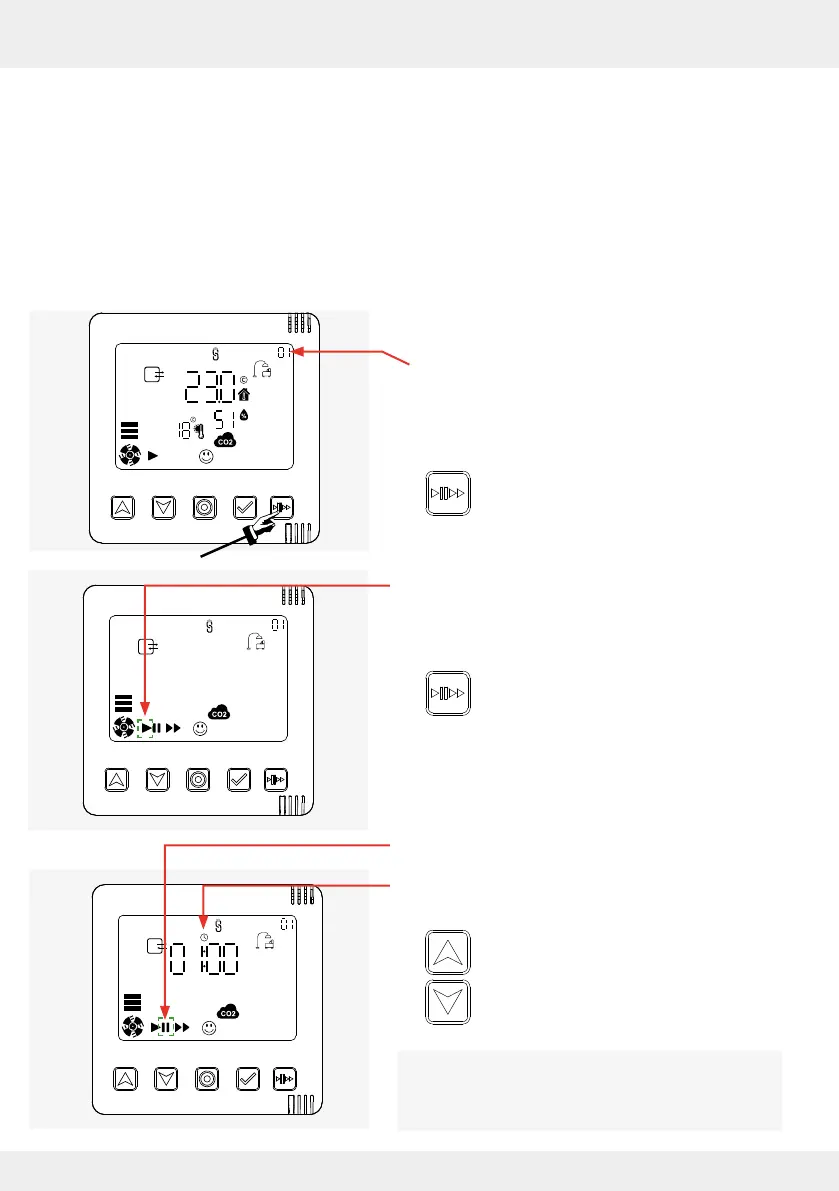
Activating the pause function globally
Requirements:
• The "System information" display screen of any
ventilation zone, here ventilation zone 1
(standard zone), is called up.
► Press the Boost/Pause key.
The auto symbol ashes on the display screen.
► Press the Boost/Pause key.
The pause symbol ashes on the display screen.
At the same time, the pause function time setting
(timer) appears on the display screen.
► Press the up and down arrow keys to set
the desired time for pause mode.
When setting the pause time, you can choose
between 1, 2, 4 and 8 hours.



 To Next Page