40
OPERATION AND SET-UP ON THE CONTROLLER
inVENTer Connect controller platform | Operating instructions
3.7 Activating the boost / pause function by zone
The boost / pause function can be activated for the entire system or specically for each
ventilation zone. This chapter describes how to activate the boost/pause function for a specic
ventilation zone.
The procedure for activating the boost / pause function globally for the entire ventilation system is
described in 3.6: Activating the boost / pause function globally.
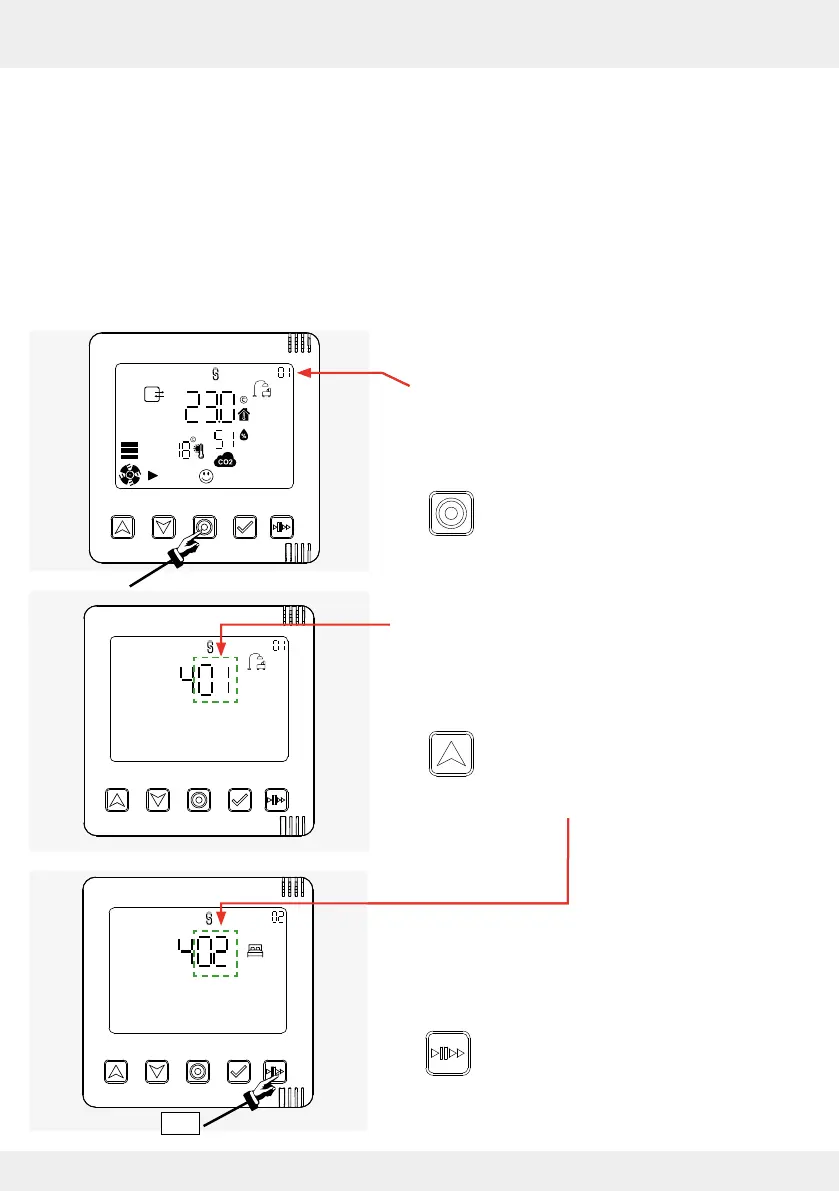
Activating the pause function by zone
Requirements:
• The "System information" display screen of any
ventilation zone, here ventilation zone 1, standard
zone, is called up.
► Press the mode key until the zone
selection window appears on the display
screen.
The zone selection for ventilation zone 1 is shown
on the display screen.
► Select the ventilation zone for which the pause
function is to be set:
• Press the up arrow key to navigate to
the next zone until you reach the desired
zone. Here it is ventilation zone 2, for
example.
You have selected the zone for which the pause
function is to be set.
► Press the Boost / Pause key 3 times in
succession.
2 x
3 x



 To Next Page