55
OPERATION AND SETUP WITH THE APP
inVENTer Connect controller platform | Operating instructions
4.7 Assigning devices to the ventilation zones
• By default, all devices are assigned to ventilation zone 1.
• The controller is automatically assigned to ventilation zone 1 and cannot be assigned to another
zone.
• The Outdoor humidity/temperature sensor and switching contact are assigned to all zones and
cannot be assigned to a specic zone.
• The other components can be assigned to one of the four ventilation zones dened in the
system.
Note: When assigning the ventilation zones, operation of the ventilation devices in pairs must
be observed (at least 2 ventilation devices per ventilation zone and an even number).
Requirements:
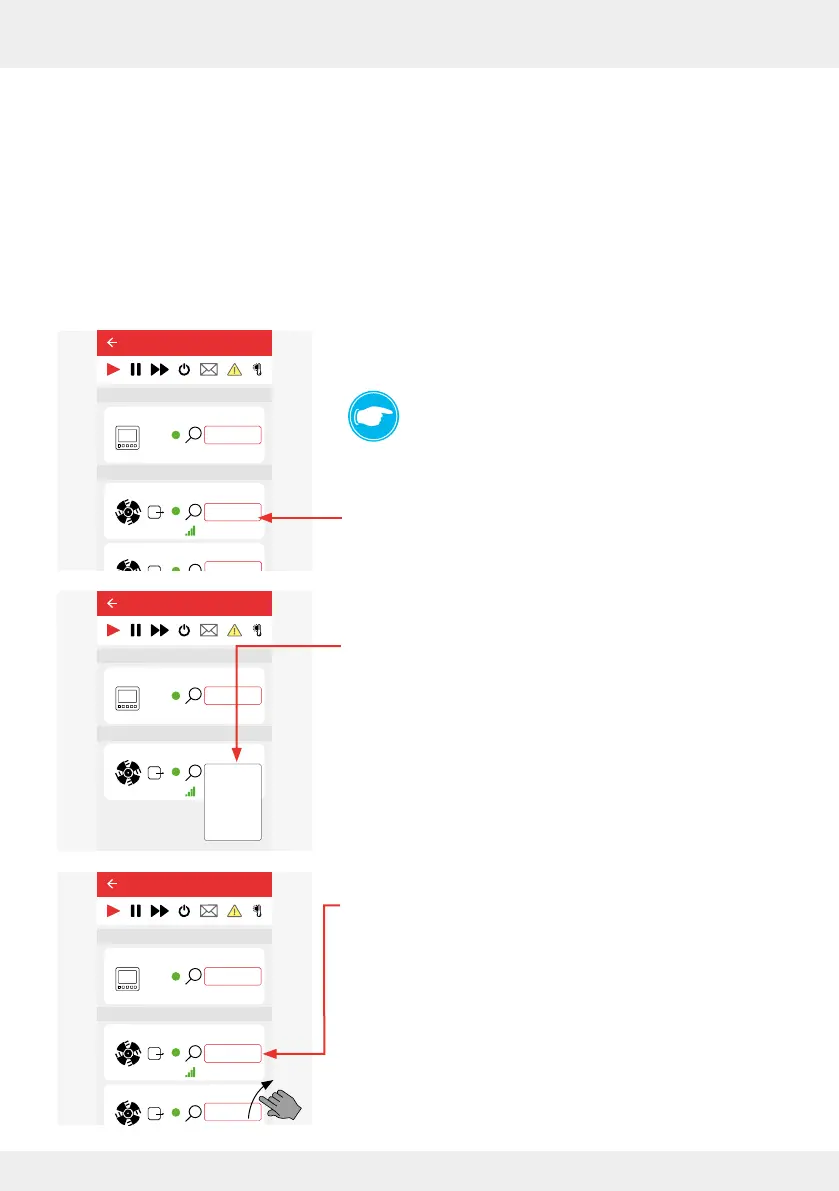
• You are in the "Device overview" menu.
TIP:
You can assign a ventilation zone other than ventilation
zone 1 to the ventilation units during setup. You can also
change this assigned ventilation zone again at any time.
► Press the "Ventilation zone" button (ventilation zone 1 or the
one already assigned, dierent from 1).
A selection window opens in which the 4 ventilation zones
are displayed.
► Press the ventilation zone to be assigned to the selected
device.
The newly assigned ventilation zone is displayed in the
device overview (here ventilation zone 4 as an example).
► Scroll through the displayed device overview and continue to
assign or change the ventilation zones as described.
Once all devices have been assigned to the desired zones,
they are displayed in the "Device overview" with the respec-
tive new ventilation zone.
26°C
26%
Device 5
25,4°C
22,1%
20,4°C
44,1%
CO2
Device 0
Fan 1
Device 2
Device 3
Device 6
Ventilation zone 1
Ventilation zone 1
Ventilation zone 1
Ventilation zone 1
Ventilation zone 1
Ventilation zone 1
Lorem ipsum
Device 4
Ventilation zone 1
Easy Connect e16
Controller
Device/Sensor
Easy Connect e16
26°C
26%
Device 0
Ventilation zone 1
Controller
Device/Sensor
Fan 1
Lüftungszone 1
Ventilation zone 1
Ventilation zone 2
Ventilation zone 3
Ventilation zone 4
26°C
26%
Device 5
25,4°C
22,1%
20,4°C
44,1%
CO2
Device 0
Fan 1
Device 2
Ventilation zone 1
Ventilation zone 1
Ventilation zone 1
Ventilation zone 1
Ventilation zone 4
Ventilation zone 1
Lorem ipsum
Device 4
Ventilation zone 1
Easy Connect e16
Controller
Device/Sensor



 To Next Page