56
OPERATION AND SETUP WITH THE APP
inVENTer Connect controller platform | Operating instructions
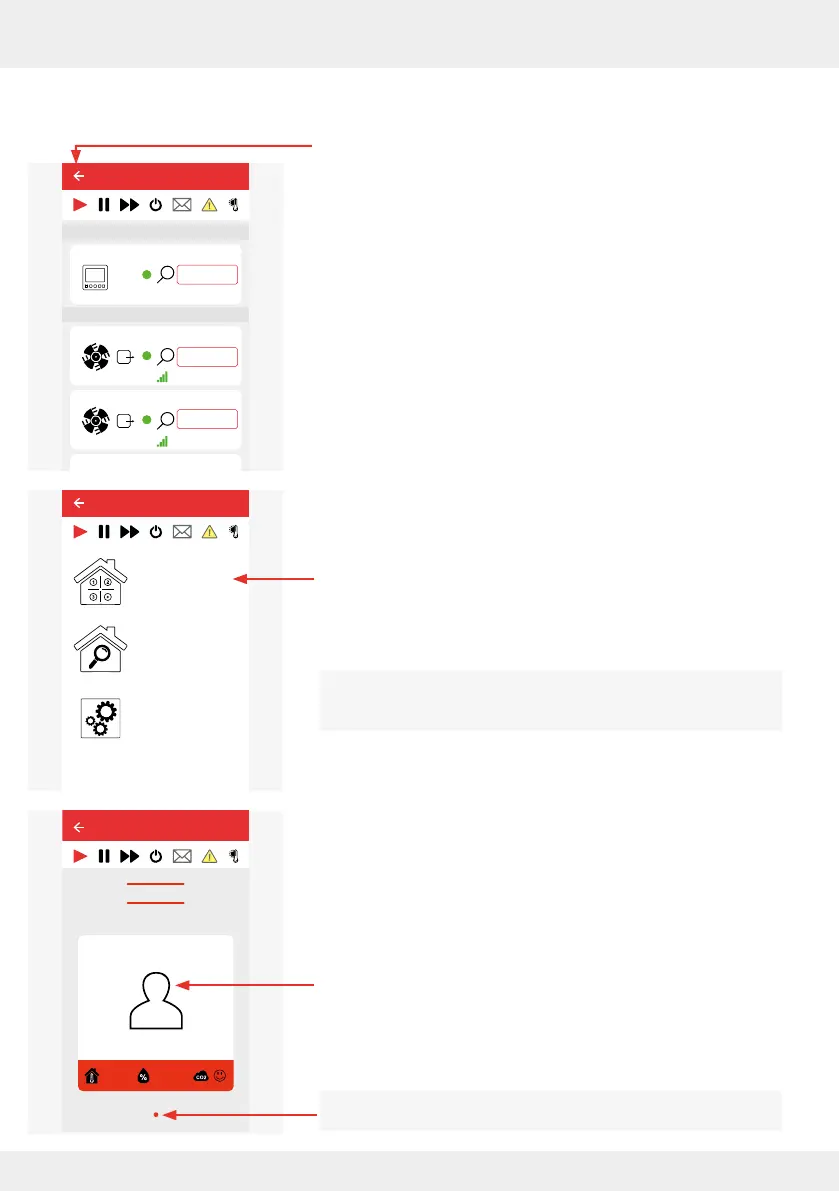
4.8 Dening ventilation zones and their properties
► Press the "Back" symbol to return to the Start menu (window
with the possible menus)
or
► Call up the Start menu as described ( 4.2: Screen of the
app).
The Start menu opens.
► Press the "Ventilation zone overview" menu item in this
window.
The "Ventilation zone overview" menu item can be opened at
any time to change settings for the ventilation zones.
The "Ventilation zone overview" menu opens.
► Press the tile of the ventilation zone.
A dot indicates that only one ventilation zone has been
dened so far.
26°C
26%
Device 5
25,4°C
22,1%
20,4°C
44,1%
CO2
Device 0
Fan 1
Device 2
Device 3
Ventilation zone 1
Ventilation zone 1
Ventilation zone 1
Ventilation zone 1
Ventilation zone 4
Ventilation zone 1
Lorem ipsum
Device 4
Ventilation zone 1
Easy Connect e16
Controller
Device/Sensor
Advanced settings
Device overview
Ventilation zone
overview
Easy Connect e16
Easy Connect e16
Ventilation zone 1
Ventilation zone overview
25,8°C
24,9%



 To Next Page