48
OPERATION AND SETUP WITH THE APP
inVENTer Connect controller platform | Operating instructions
4 Operation and setup with the app
4.1 Adding the controller to the app
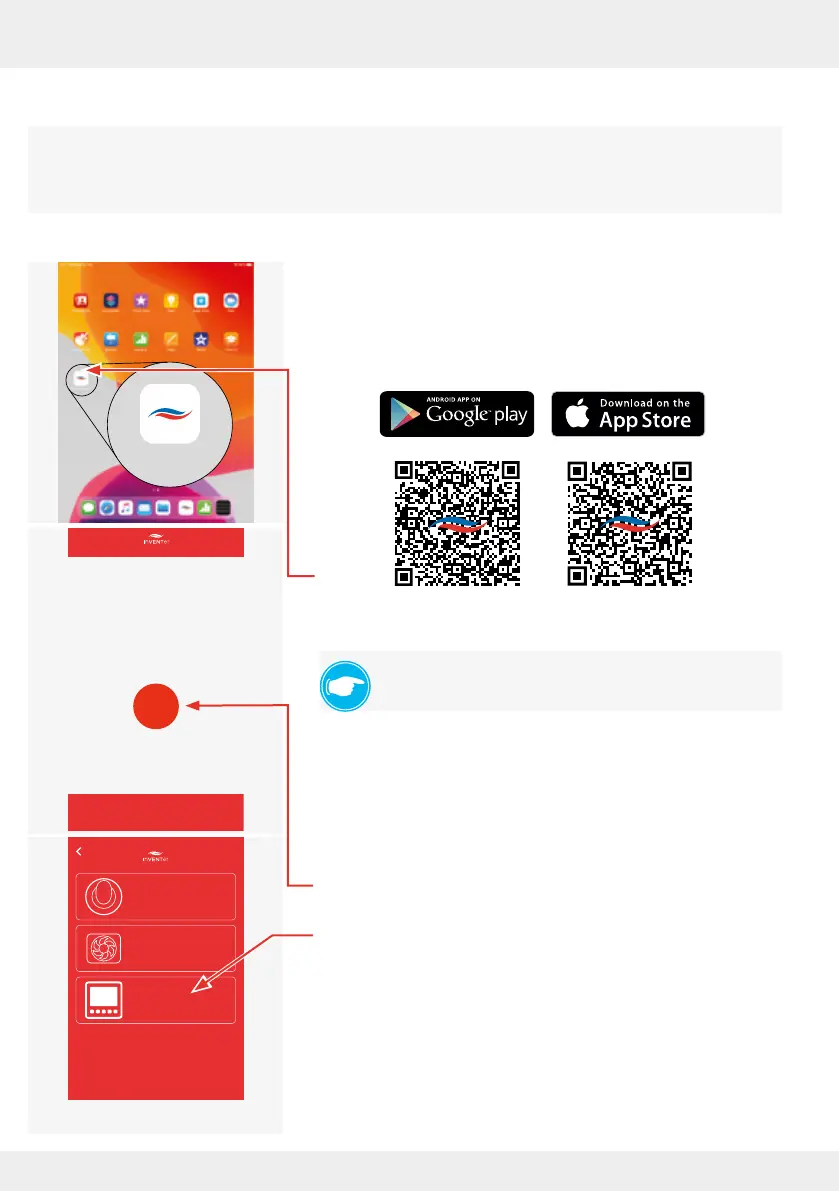
► Download the "inVENTer Mobile" app to your mobile device
(mobile phone or tablet with Android or iOS operating
system).
The app is obtained:
After successful installation of the app, the corresponding
icon appears on the display screen.
Enable Bluetooth and location on your mobile device if
these functions are disabled.
► Touch the "inVENTer Mobile" app icon on the display screen
of your mobile device.
The start screen appears.
► Touch the START button.
A window appears with a selection of devices that can be
paired with your mobile device if necessary.
► Select the "Easy Connect e16" button here.
The most convenient way to operate the inVENTer Connect system is with the "inVENTer Mobile"
app. This is why mainly this form of operation is described here.
To connect the app to the controller, Bluetooth must be enabled and the app must be given loca-
tion access.
Inventer Mobile
Welcome to inVENTer Mobile!
Set up your new inVENTer product
in short and easy steps.
Schritten ein.
START
INSTALLATION
Aviant
Pulsar
Easy Connect e16
Back



 To Next Page