47
OPERATION AND SET-UP ON THE CONTROLLER
inVENTer Connect controller platform | Operating instructions
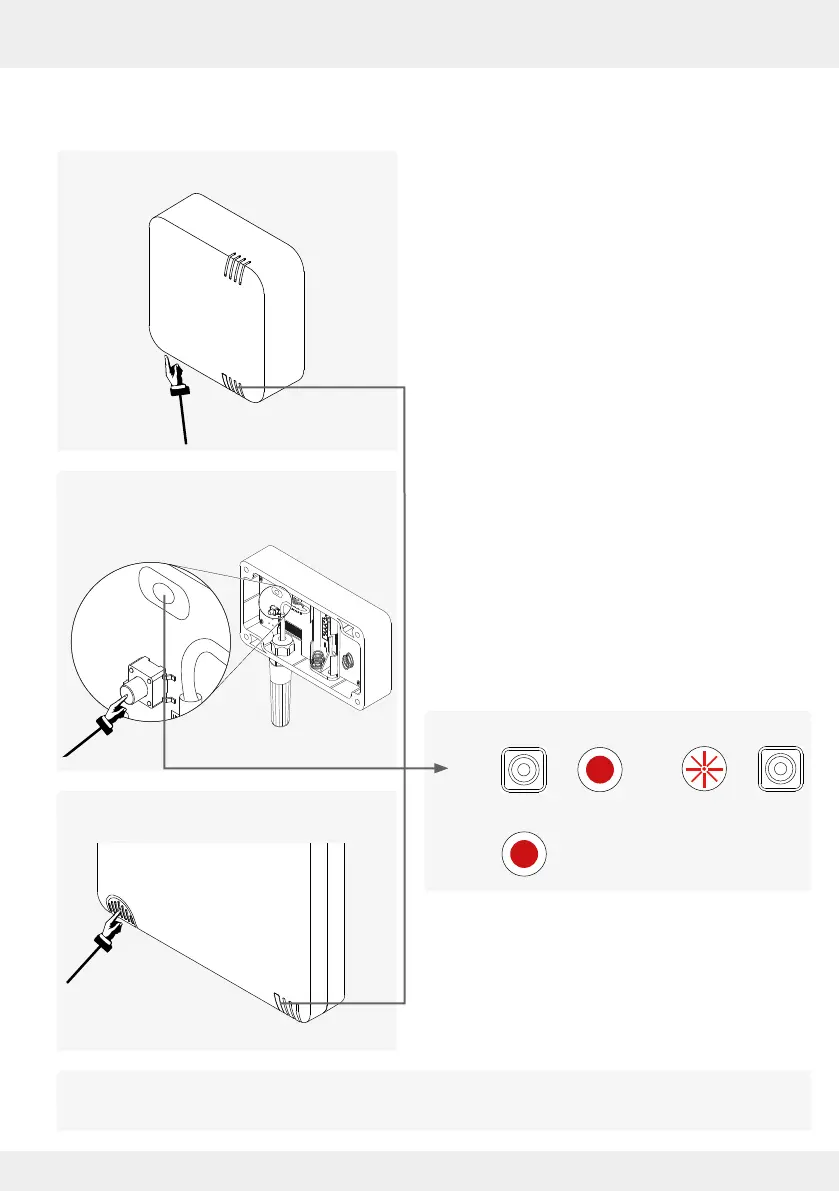
• FTS19-Connect Outdoor
humidity/temperature sensor
Brief overview
The reset devices must then be re-paired with the Easy Connect e16 controller to be included in
the system again ( 3.3: Pairing sensors).
The steps for resetting described below apply equally to all other components (sensors, switching
contact).
• FTS19-Connect Indoor
humidity/temperature sensor
► Press and hold the button until the LED lights up
solid RED. (1)
► Release the button.
The LED ashes RED for approx. 10 seconds. (2)
► During these 10 seconds, press the button on the
• Indoor humidity/temperature sensor (on the
underside of the housing)
or
• Outdoor humidity/temperature sensor (in the
housing)
or
• CO
2
sensor
or
• Switching contact
again to conrm the reset procedure.
The LED lights up permanently RED. (3)
The complete start routine then runs as described
for commissioning.
• CS2-Connect CO
2
sensor
• SK19-Connect switching contact
The system is now ready for reconguration.
10 Sec.



 To Next Page