53
OPERATION AND SETUP WITH THE APP
inVENTer Connect controller platform | Operating instructions
4.4 Device identication
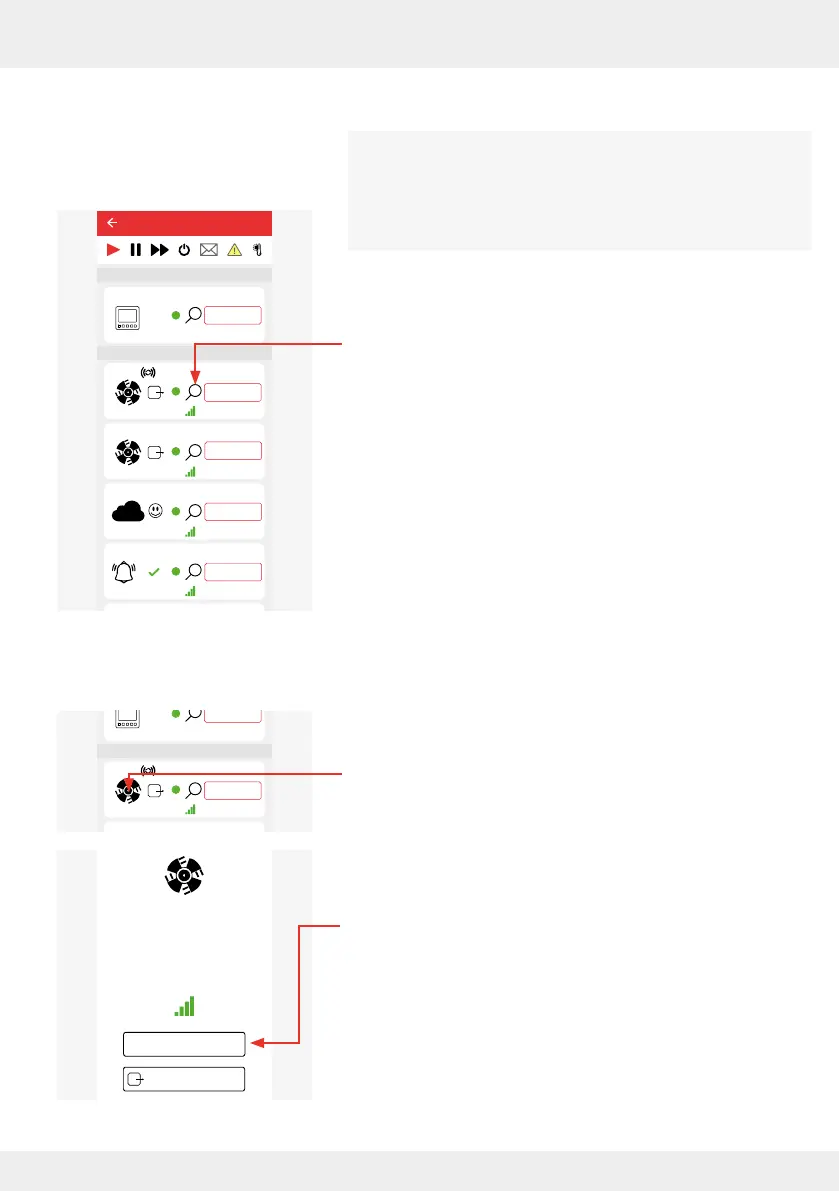
A system component can be identied by clicking on the identify
symbol (magnifying glass). This is necessary, for example, if
a device is to be renamed but it is unclear which device it is.
Device identication cannot be carried out for battery-operated
components (Indoor / Outdoor humidity/temperature sensor).
Requirements:
• You are in the "Device overview" menu.
► Press the Identify icon of the component whose location you
want to know.
Component is found:
The LED on the corresponding component ashes alternately
PURPLE and YELLOW.
Or
Component is not found:
Step 1: If necessary, use a signal amplier (repeater)
( 4.10).
Step 2: If this does not help, perform a reset of the
corresponding device ( 3.9: Resetting the controller and
components) and reconnect the device.
4.5 Renaming components
Requirements:
• You are in the "Device overview" menu.
• The component is identied, if necessary ( 4.4)
► Press the symbol of the component you want to rename.
The adjacent window opens. The software version and the
strength of the radio signal are displayed.
► Press the "Edit device name" button to edit the device name.
26°C
26%
Device 5
25,4°C
22,1%
20,4°C
44,1%
CO2
Device 0
Device 1
Device 2
Device 3
Ventilation zone 1
Ventilation zone 1
Ventilation zone 1
Ventilation zone 1
Ventilation zone 1
Ventilation zone 1
Lorem ipsum
Device 4
Ventilation zone 1
Easy Connect e16
Controller
Device/Sensor
26%
Device 5
25,4°C
22,1%
20,4°C
44,1%
CO2
Device 0
Device 1
Device 2
Device 3
Device 6
Ventilation zone 1
Ventilation zone 1
Ventilation zone 1
Ventilation zone 1
Ventilation zone 1
Ventilation zone 1
Lorem ipsum
Device 4
Ventilation zone 1
Easy Connect e16
Controller
Device/Sensor
Device name: Device 1
Software version: 5.23.0
Radio signal
Edit device name
Ventilation device rotation
direction (V)



 To Next Page