18
OPERATION AND SET-UP ON THE CONTROLLER
inVENTer Connect controller platform | Operating instructions
3.2 Initial setup of the controller
Requirements:
• The controller and all devices relevant to the venti-
lation system are installed.
► Establish the power supply for all devices in the
system.
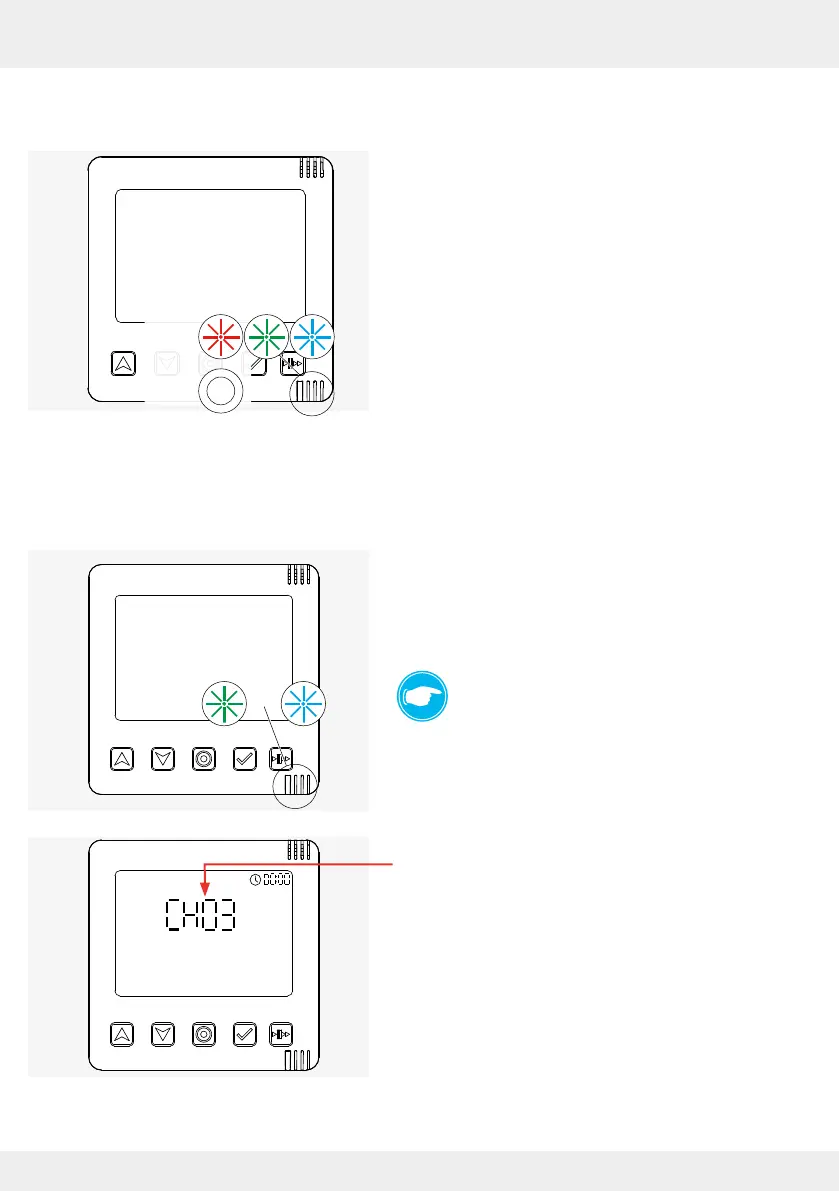
The controller performs rmware and hardware
checks for the system. The LED ashes RED,
GREEN and BLUE during this process (1).
After a successful rmware and hardware check,
the LED lights up WHITE (2).
The controller changes to the radio channel setting.
Selecting the channel for the RF868-MHZ radio connection
Requirements:
• Firmware and hardware check successful.
The controller searches for the best radio channel,
the LED ashes alternately GREEN and
TURQUOISE.
TIP:
There are 5 channels available.
We recommend using the automatically
assigned channel.
Dierent channels can be selected for
adjacent residential units.
The best radio channel is indicated on the control-
ler's display. The LED ashes alternately GREEN
and TURQUOISE.



 To Next Page