49
OPERATION AND SETUP WITH THE APP
inVENTer Connect controller platform | Operating instructions
The display screen shows the request to pair with the con-
troller.
To use the app, a Bluetooth connection must rst be estab-
lished between the controller and the mobile device.
Please bear in mind the Bluetooth range.
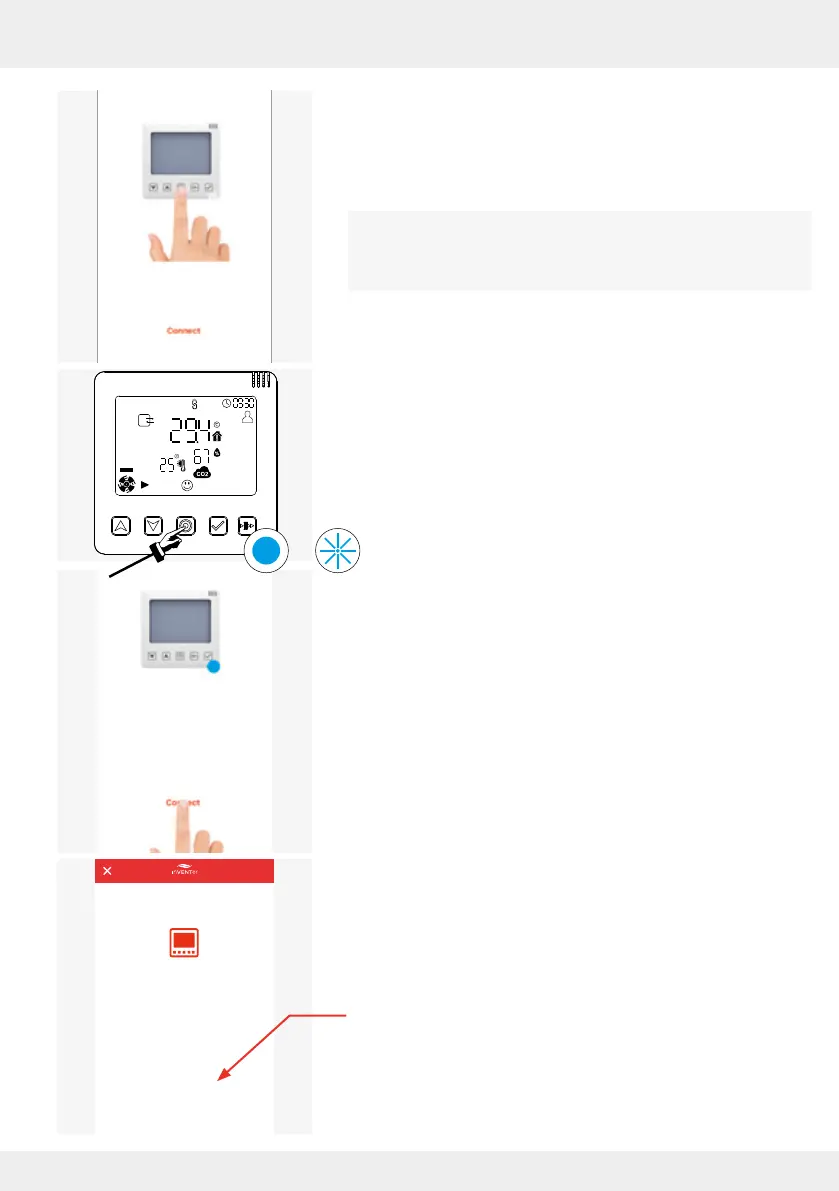
Establish a Bluetooth connection by:
► pressing the mode key on the controller until the LED turns
BLUE, then release it.
The LED on the controller ashes BLUE and the Bluetooth
connection can be established.
► While the LED on the controller is ashing BLUE, press the
"Connect" button on your mobile device.
The controller and mobile device connect.
A message appears when the connection is completed.
► Press "Complete setup".
A new window opens.
CONGRATULATIONS!
You have just completed the setup of your
inVENTer. The app allows you to set the unit’s
ventilator speed and automatic functions.
COMPLETE SETUP
CANCEL SETUP



 To Next Page