57
OPERATION AND SETUP WITH THE APP
inVENTer Connect controller platform | Operating instructions
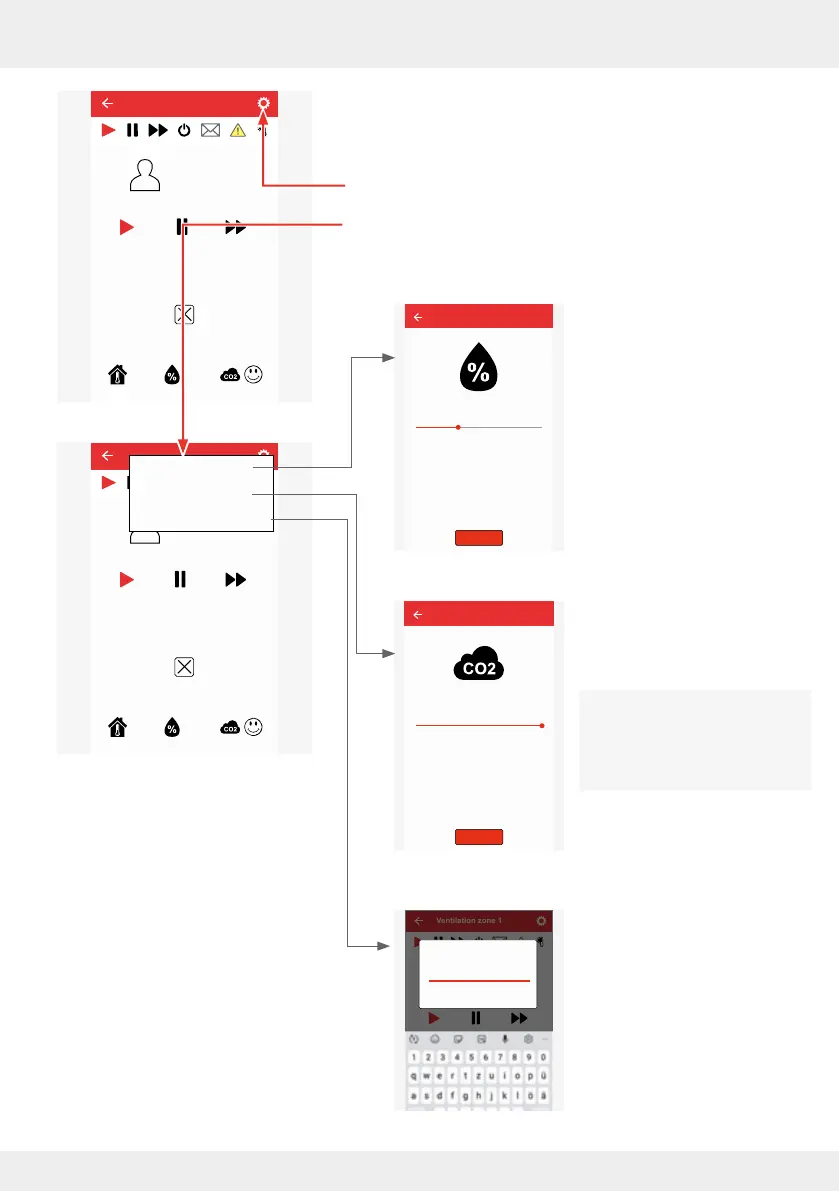
The adjacent window opens, in which
• the properties of this ventilation zone are displayed.
• settings for this ventilation zone can be changed.
► Press the "Settings" button.
A new selection window opens.
The following settings can be made or changed:
• Ambient humidity
You can change the humid-
ity limit by moving the slide
control.
Then press "Save".
• CO
2
You can change the CO
2
limit
by moving the slide control.
Then press "Save".
Limit recommendations are:
Pettenkofer: 1000 ppm
General minimum requirement:
1500 ppm
• Name of the ventilation zone
If desired, enter a new name
for the selected ventilation
zone. This is freely selectable
and can consist of a maximum
of 16 characters.
Press "OK" and conrm the
new name.
Default
Current ventilator power level 1
Ventilation zone 1
Override
25,8°C 24,9%
Default
Current ventilator power level 1
Ventilation zone 1
Override
25,8°C 24,9%
Ambient humidity
CO2
Enter the name of the ventilation zone
Ambient humidity
60% 90%
70%
Save
CO2
1500 ppm
Save
1000 ppm 1500 ppm
Default
Ventilation zone 1
Enter new name for
ventilation zone
Ventilation zone 1
OKCANCEL



 To Next Page