22
SL7D REAR SEAT VIDEO HEADREST SYSTEM Owner’s Manual
IRT ON/OFF
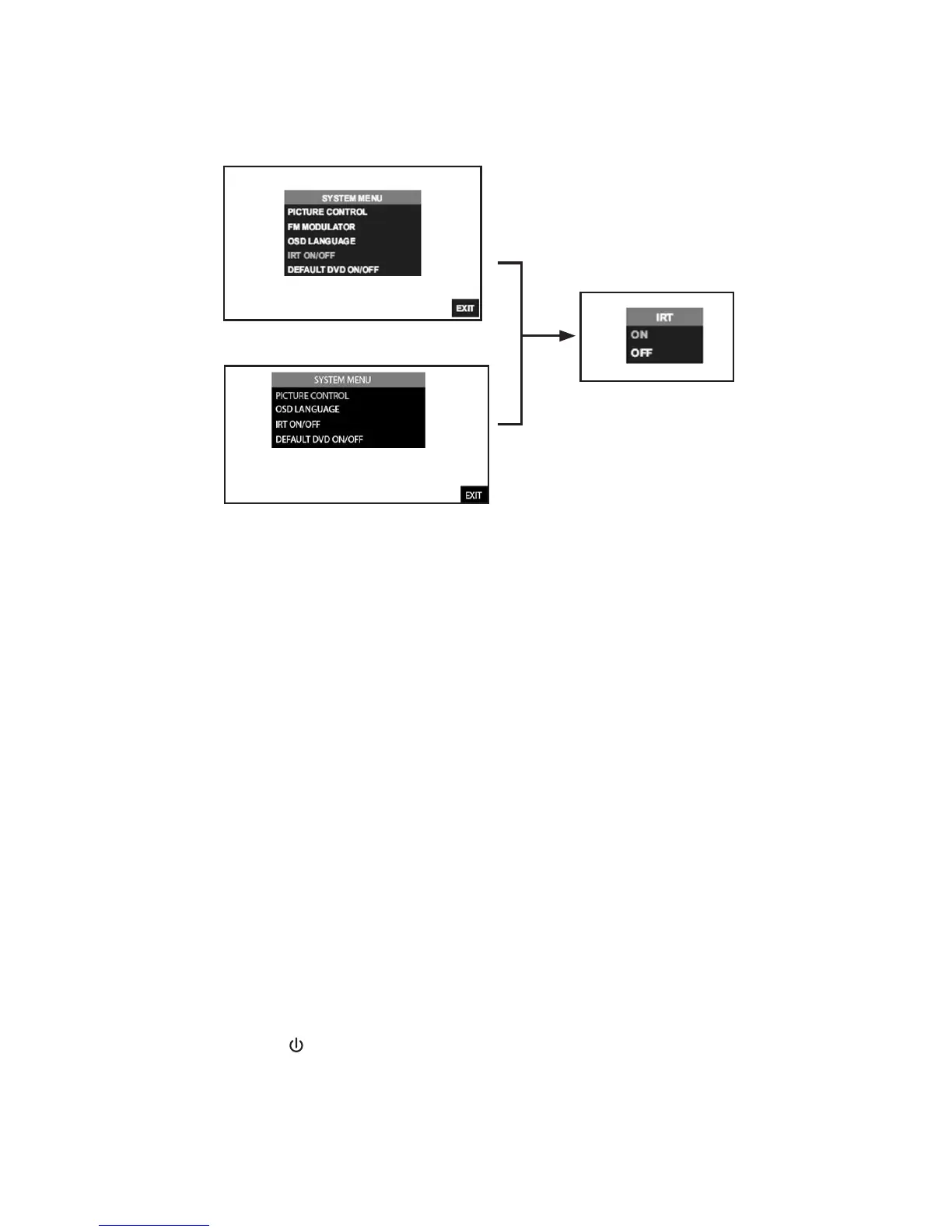
IRT ON/OFF (M1) from the Front Panel (Figure 19):
1� Press the MENU/SELECT button on the front panel (Figure 12) of the system to show the
System Menu�
2� Use the UP or DOWN direction buttons to select IRT ON/OFF and press the ENTER button
to enter the sub-menu�
3� Use the UP or DOWN direction buttons to select IRT ON or OFF and press the
ENTER button to enter selection� When ON is selected, IRT ON will be displayed on the
screen� When OFF is selected, IRT OFF will be displayed on the screen�
IRT ON/OFF (M1) from the Remote Control
4� Select “M1” or “M2” on the Remote Control�
5� Press the System Menu button then use the UP or DOWN direction buttons (Figure 11) to
select IRT ON/OFF and press the ENTER button to enter the sub-menu�
6� Use the UP or DOWN direction buttons to turn the IRT ON or OFF and press the
ENTER button to enter selection� When ON is selected, IRT will be displayed on the
System Menu screen� When OFF is selected, IRT OFF will be displayed on the screen�
IRT ON/OFF Direct Access Button on the Remote Control
7� Select “M1” or “M2” on the Remote Control�
8� Press the IRT ( ) button (Figure 9) to turn the IRT ON or OFF� When ON is selected, IRT
ON will be displayed on the screen� When OFF is selected, IRT OFF will be displayed on the
screen and will disappear from screen within 6 seconds�
Figure 19
SYSTEM SETUP SUBMENUS (continued)
SL7D(M1)
SL7D (M2)


 To Next Page