23
SL7D REAR SEAT VIDEO HEADREST SYSTEM Owner’s Manual
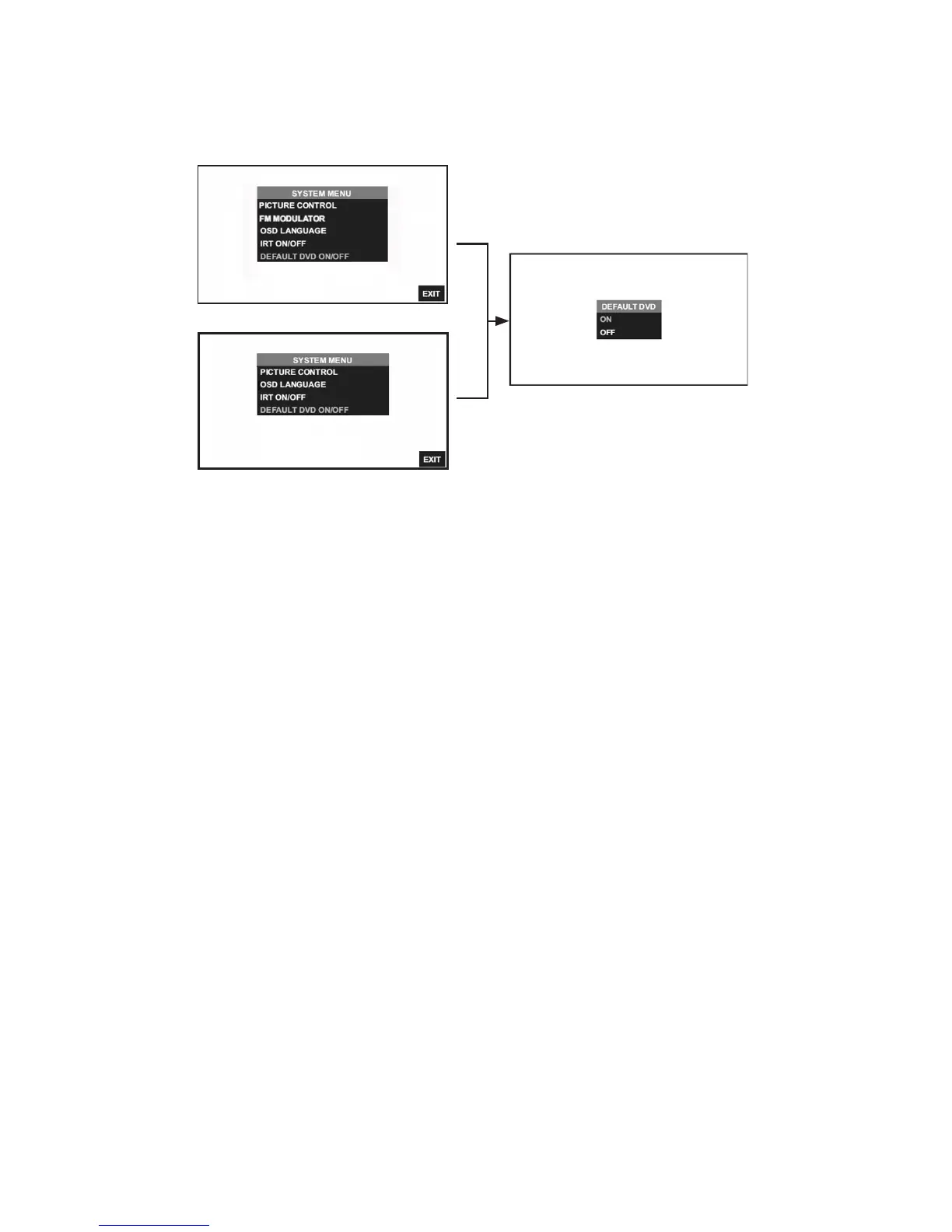
DEFAULT DVD ON/OFF
With the “Default DVD ON” feature selected, the unit will default to DVD Mode each time the
system is turned ON� For example, if the user is playing a game and the system is turned OFF,
the next time the system is turned ON, it will power-up in DVD Mode.
Default DVD ON/OFF from the Front Panel (Figure 20):
1� Press the MENU/SELECT button on the front panel (Figure 12) of the system to show the
System Menu
2� Use the UP or DOWN direction buttons to select DEFAULT DVD ON/OFF and press the
ENTER button to enter the sub-menu�
3� Use the UP or DOWN direction buttons to select DEFAULT DVD ON or OFF and press the
ENTER button to enter selection�
Default DVD ON/OFF from the Remote Control
1� Select “M1” or “M2” on the Remote Control�
2� Press the System Menu button then use the UP or DOWN direction buttons (Figure 11) to
select DEFAULT DVD ON/OFF and press the ENTER button to enter the sub-menu�
3� Use the UP or DOWN direction buttons to select DEFAULT DVD ON OR OFF and press the
ENTER button to make the selection�
Figure 20
SYSTEM SETUP SUBMENUS (continued)
SL7D (M1)
SL7D (M2)


 To Next Page