Setting Date & Time
You can set the camera’s clock with the ion software to ensure that your video and
photo files are saved with the correct date/ time information.
To set up the camera clock
1.
Connect your camera to a computer with the USB cable. Run ion.exe at your
MicroSD card folder.
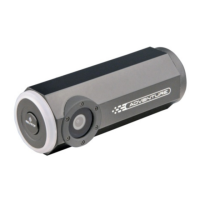
2. Find the “Date and Time” and click “SET”.
3.
Adjust the date and time or click “ Sync with PC” to set with your PC clock.
4. Click “Ok” to save the settings.
EN - 24 www.iontheaction.co.uk



 To Next Page