TIGER XT Instrument User Manual V1.2
Pioneering Gas Sensing Technology. Page 16 of 71 ionscience.com
4. Understanding the Display Screen
IF AN ALARM STATE IS TRIGGERED THE USER SHOULD LEAVE THE HAZARDOUS
ENVIRONMENT AND ACT IN ACCORDANCE WITH NATIONAL SAFETY
REGULATIONS.
Overview
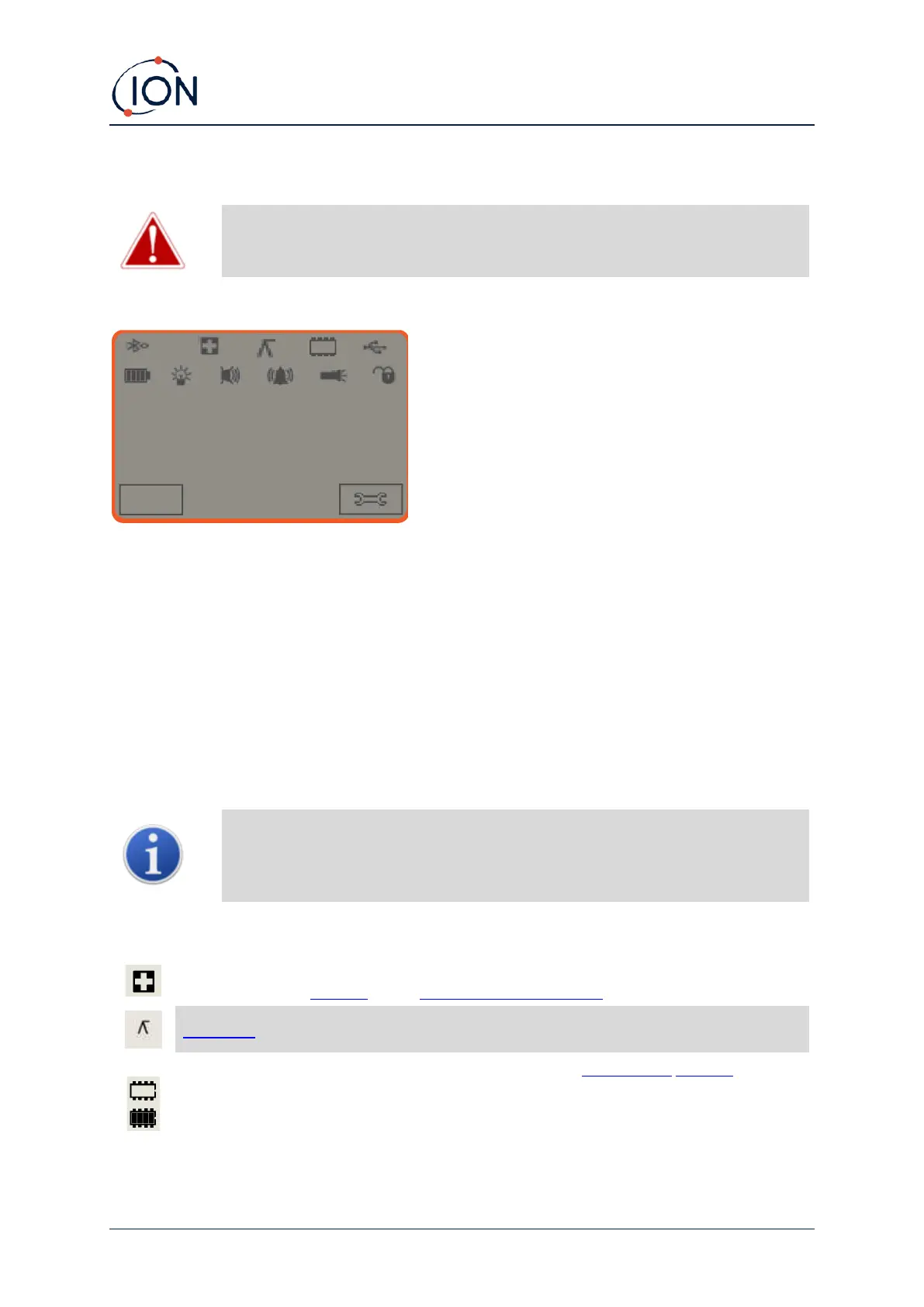
The display screen is divided into four sections:
1. The top of the screen shows fixed LCD status icons indicating instrument status at a glance.
The icons display only when a function is selected.
2. The main screen area displays numerical readings in four large numbers during normal
operation (i.e., when the central running screen is displayed). During setup and adjustment,
a function bar overlays the display.
3. The bottom left and right areas of the screen display the two soft key indicators, i.e., which
particular functions are currently associated with the A and B keys.
4. The area between the two soft key indicators displays the measurement units and the gas
that the instrument is currently set to detect.
The TIGER XT instrument auto-ranges, therefore the number of decimal places
reduce as the VOC reading increases. The minimum achievable sensitivity is 0.001
ppm, the maximum is 19,999 ppm. When the maximum range is exceeded, the
display will show ‘99999’.
Health and Safety: This will flash in an alarm condition and (if the instrument has the
Health and Safety upgrade) when health and safety readings are being collected.
Peak Hold: This is displayed when peak hold is on.
Memory Status: Only displayed if the instrument has the Data Logging upgrade. Four
sections within the border fill as the data log memory is filled.
Empty border = 100% memory available through to full, where all segments are present.
The icon fills as data log memory is filled. It will flash when multi-logging is activated.



 To Next Page