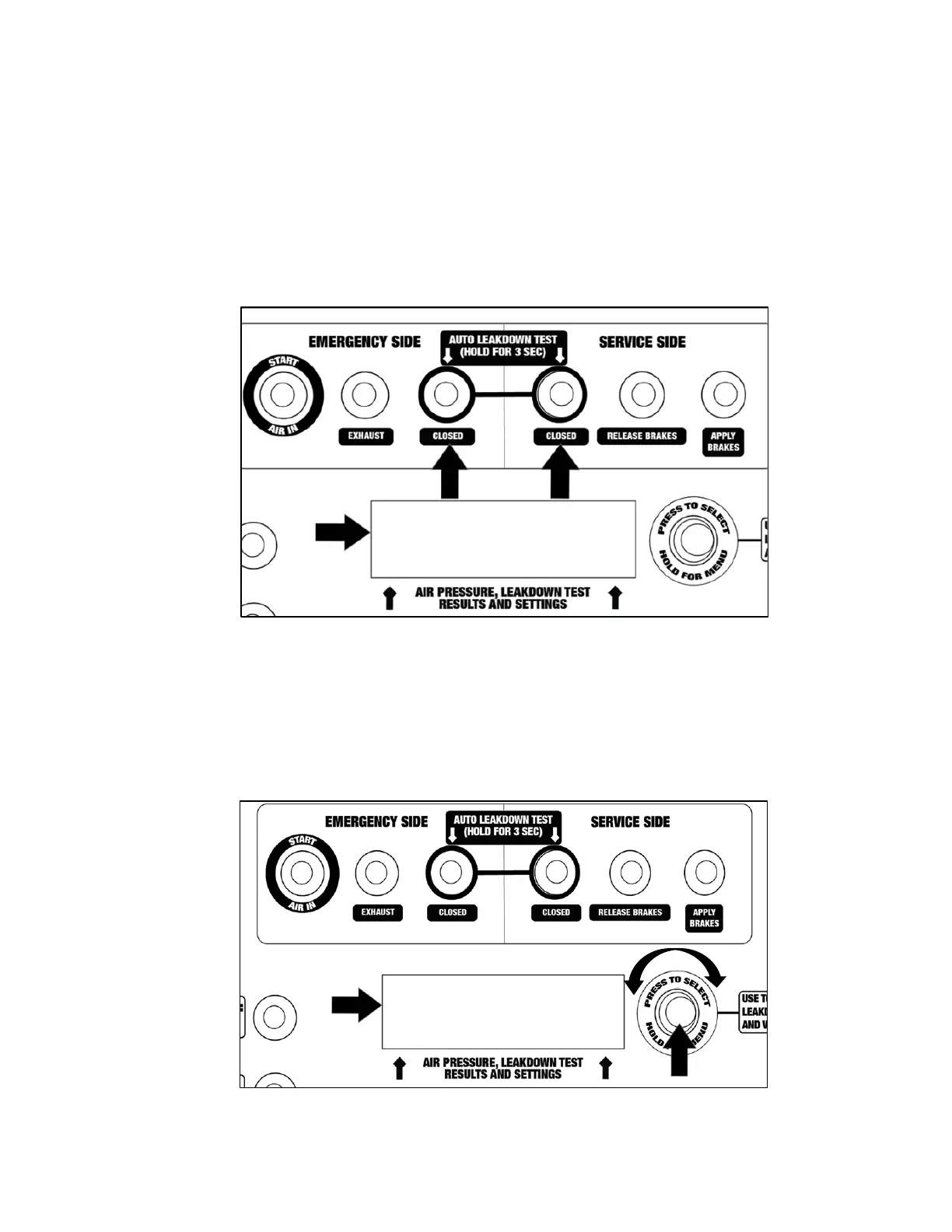
Automatic Leak Down Test
An Automatic (AUTO) Leak Down test allows a technician/operator to perform a test with preset pass/fail
parameters (time and acceptable psi loss). The Alpha MUTT
®
will conduct the Leak Down test and display
results when complete. For testers that include the IPA
®
tablet, these results are recorded as a data point
and can be used in the Alpha MUTT
®
Inspection Software or exported to a third-party software/inspection
program. Refer to Part 11: Inspections and Reporting for more information.
1. Complete the steps in sections 9.1 and 9.2. If these steps are not completed, the Automatic
Leak Down test will not begin and the tester will alert the user.
2. Press and hold the Close button on both the Emergency and Service sides simultaneously
for 3 seconds.
3. Follow the prompts on the Upper LCD screen to complete the test.
Changing Automatic Leak Down Test Parameters
1. Press and hold the Upper Control knob for 3 seconds. Turn the knob to select the settings
option. Then press and release the Upper Control knob again.
2. Follow the Upper LCD screen prompts to set test time, test pressure, and allowable psi
loss/tolerance.
RED TIMER BLUE
116 3:00 116



 To Next Page