10.2 Manual Controls
METHOD #1 – LCD screen on the control panel.
(Must select power source then ABS circuit for this operation.)
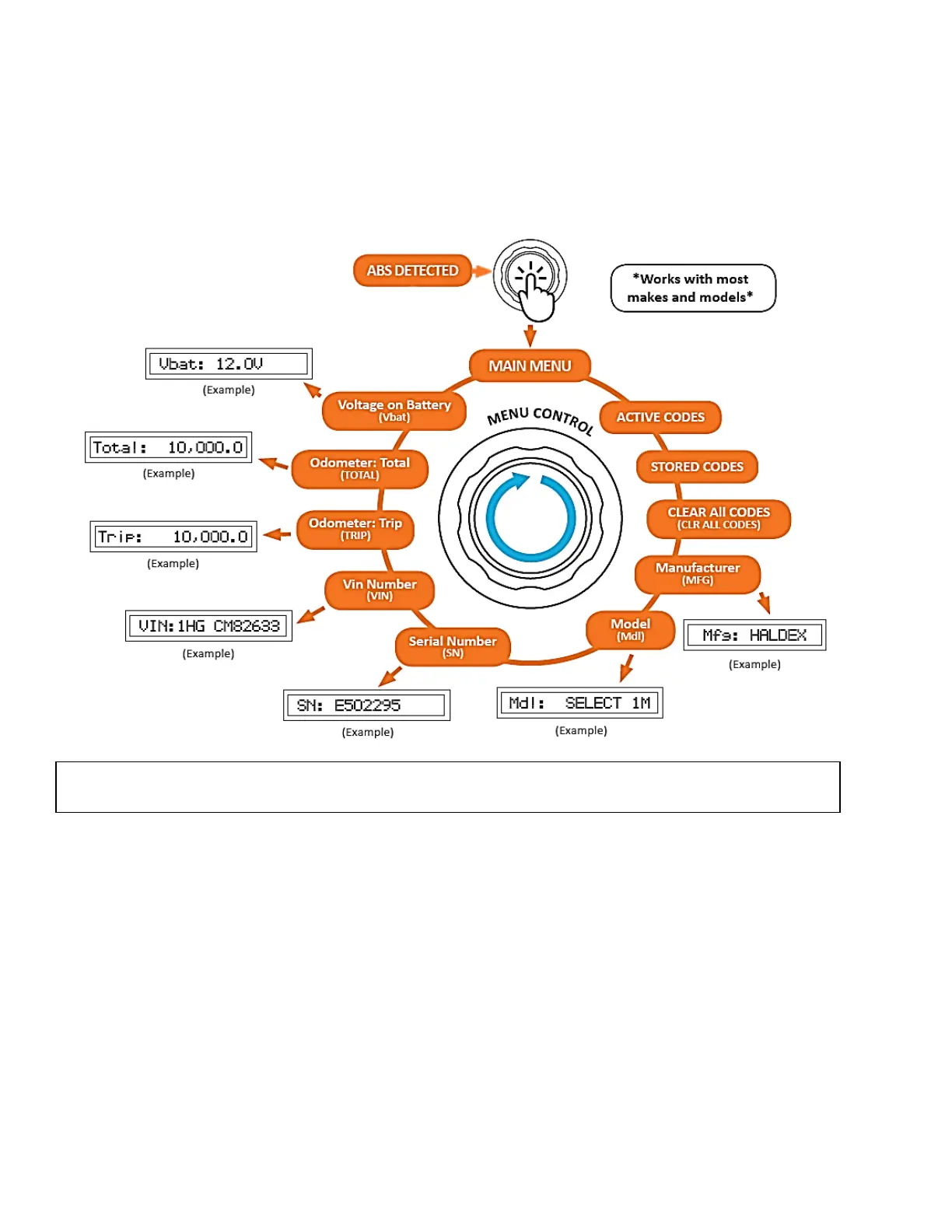
In this method, the user must use both the press function and the turn function of the control knob to access
various menus and read through ABS troubleshooting information that is available within the LCD screen.
Once the tester is turned on and ABS is detected, you can turn the Menu Control knob to cycle through
menus or sub menus. Press the control knob to access the sub menus.
The Alpha MUTT
®
communicates with the trailer’s ABS ECU in real time, via IPA
®
’s proprietary internal
ABS PLC communication module. This module is automatically activated as long as the ABS/AUX circuit
is selected/powered up by the tester. Once activated, the ABS module will send information request
commands to the trailer’s ECU. The trailer’s ECU will automatically broadcast back the ECU make,
model, vin, and mileage along with other basic information. This information is then stored inside the
internal computer of the tester.
When fault codes or clear fault commands are requested, the ABS PLC communication module will send
the command to the trailer’s ECU. The user must then request fault codes again to verify that there are
no active faults. Each Alpha MUTT
®
provides ABS data status lights which indicate the status of
information either being sent to the trailer in the form of commands, or information being broadcasted
from the trailer to the tester. When troubleshooting ABS connectivity issues, it is imperative for the
technician to view these status LEDs. Failing to view the status LEDs could result in false assumptions
such as a faulty ABS computer, broken ABS light, and others.
NOTE: Turning the control knob clockwise allows you to scroll through each sub menu. Turning the
control knob counterclockwise will back you out one sub menu at a time.



 To Next Page