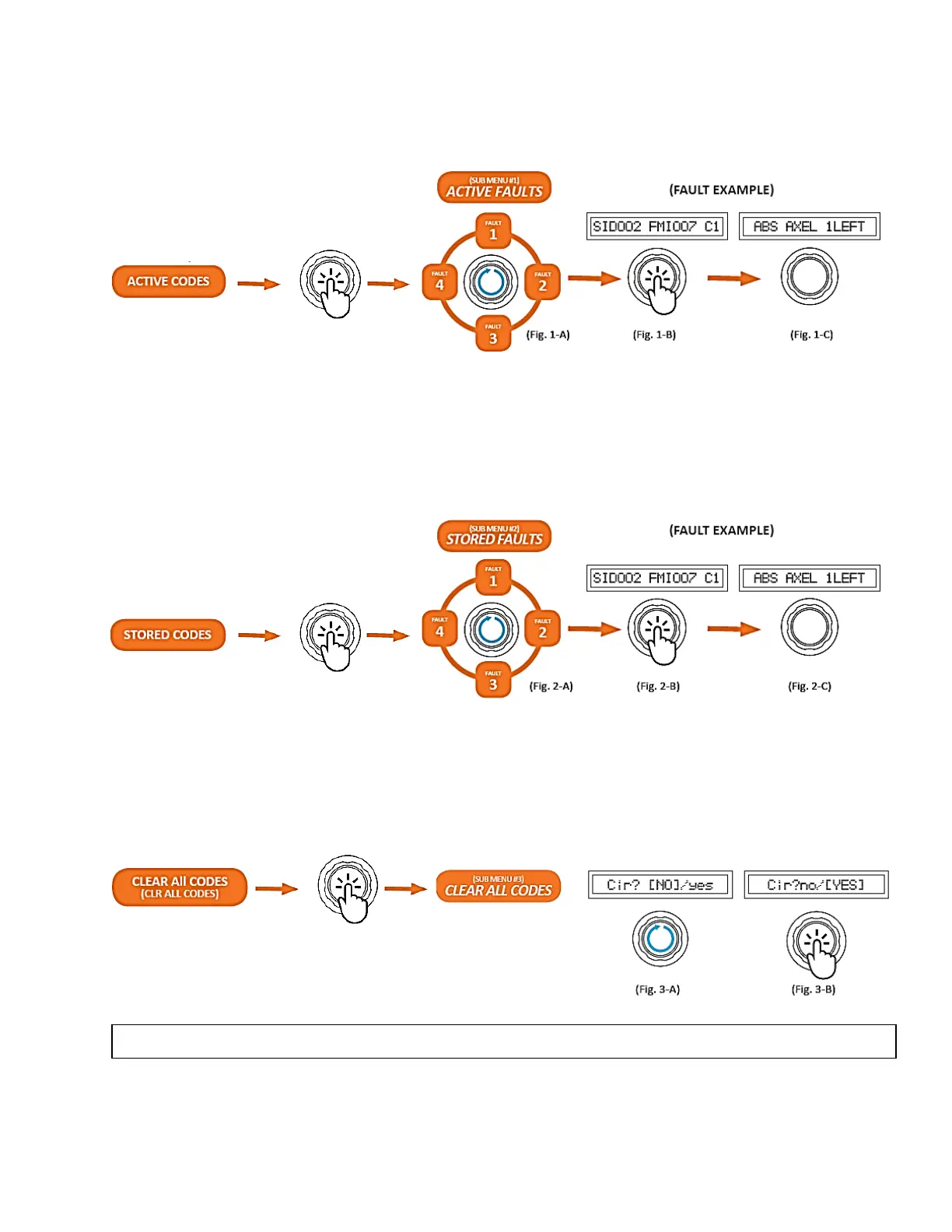
Accessing Active Faults (Sub Menu #1)
With the ACTIVE FAULTS Sub Menu 1 selected and the Active SID and FMI codes displayed, turn
the control knob clockwise to cycle through the fault codes (Fig. 1-A). Press the control knob (Fig. 1-
B) to read the Fault Description (Fig. 1-C).
Accessing Stored Faults (Sub Menu #2)
With the STORED FAULTS Sub Menu 2 selected and the Stored SID and FMI codes displayed, turn
the control knob clockwise to cycle through the fault codes (Fig. 2-A). Press the control knob (Fig. 2-
B) to read the Fault Description (Fig. 2-C).
Clear All Codes (Sub Menu #3)
With the CLR ALL CODES Sub Menu 3 selected, the screen will display CLR? NO/YES. Turn the
control knob to YES or NO depending on your desire (Fig. 3A). Press the control knob to make your
selection (Fig. 3-B).
NOTE: You can only clear stored codes. Clearing a code will return you to the main menu.



 To Next Page