PART 11: INSPECTIONS AND REPORTING
The Alpha MUTT
®
app performs wireless diagnostic electrical tests and PM inspections. It includes an
Inspection Creation feature which allows users to create custom DOT and PM inspections and generates,
stores and shares reports via email. Sharing reports requires an email account be set up on the tablet.
11.1 Electrical Inspections
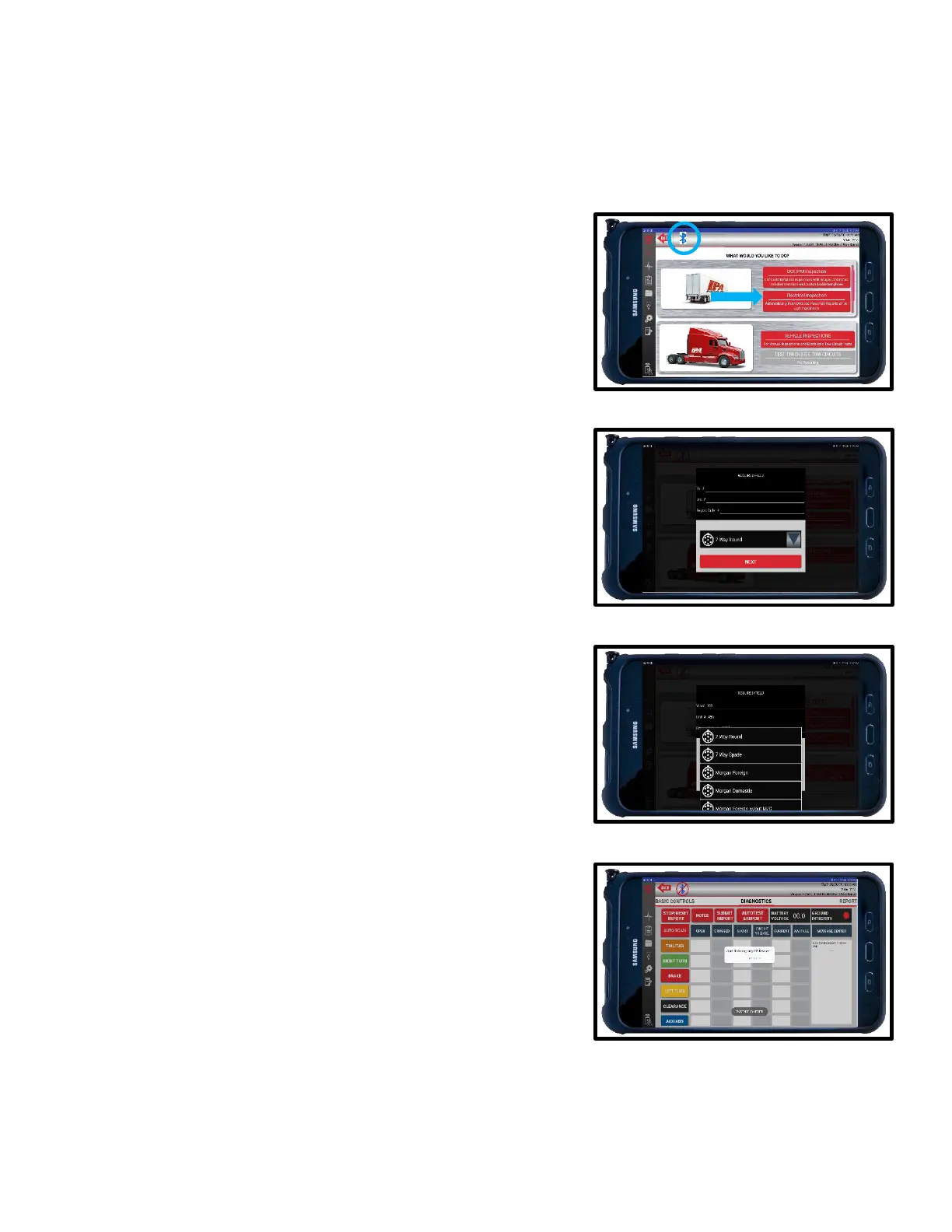
1. To begin, select ELECTRICAL INSPECTION from
the main menu. Make sure there is Bluetooth
®
connectivity between the tablet and the Alpha
MUTT
®
.
2. Enter all required information:
a. Vin #
b. Unit #
c. Report Order #
3. Use the drop-down menu to select the configuration
you wish to test:
7-Way Round
7-Way Spade
Morgan Foreign
Morgan Domestic
Morgan Foreign w/out M/C
Morgan Domestic w/out M/C
Nato
6-Way
5-Way
4-Way
4. Press NEXT to initiate scan. The app will
automatically scan all circuits. Results will appear
across each circuits row in a PASS/FAIL
designation.



 To Next Page